

Does antivirus protect small businesses from all cybersecurity threats?
Antivirus software provides a basic layer of protection for small businesses by identifying and blocking known malware. However, it is far from sufficient to address the growing and complex cybersecurity threats businesses face today. Modern attacks like ransomware, phishing, zero-day exploits, and insider threats often bypass traditional antivirus tools, leaving businesses vulnerable.
Key points to consider:
- 43% of cyberattacks target small businesses, as they are often seen as easy targets due to limited resources.
- 60% of small businesses close within six months of a major cyberattack, with average costs exceeding $250,000 per incident.
- Antivirus software primarily detects known threats but struggles with:
- Zero-day vulnerabilities: Exploits for which no antivirus signature exists.
- Social engineering attacks: Phishing and credential theft that do not involve malware.
- Insider threats: Malicious actions by trusted users or compromised accounts.
- Modern threats include AI-driven phishing campaigns, fileless malware, and Ransomware-as-a-Service (RaaS), which are not effectively mitigated by antivirus alone.
To truly protect your business, you need a multi-layered approach that includes firewalls, multi-factor authentication (MFA), employee training, regular backups, and managed detection and response (MDR) services. Antivirus is just one piece of the puzzle in a broader cybersecurity strategy.
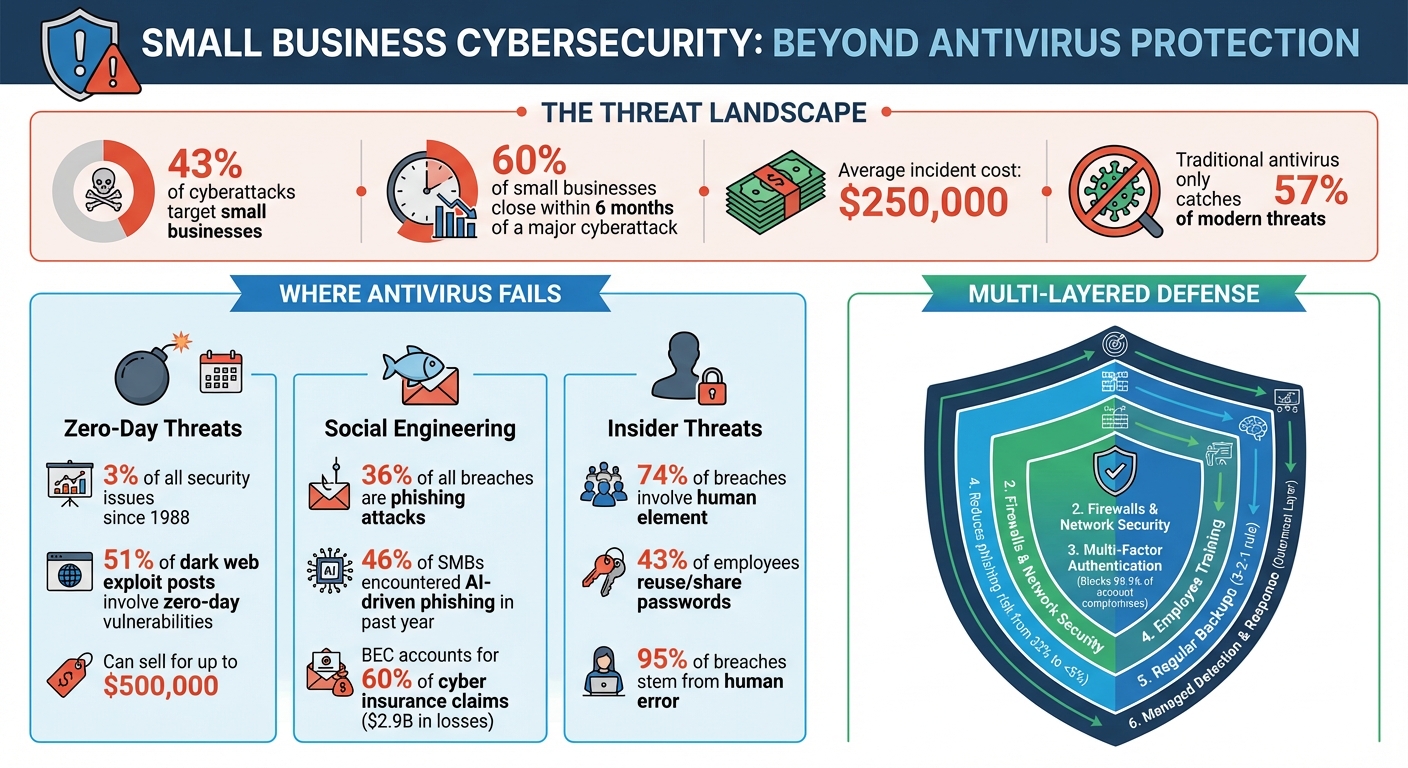
Small Business Cybersecurity Threats: Key Statistics and Protection Layers
How Can Small Businesses Protect Against Cyber Security Threats? With Steven Wright (S2025,E34)
sbb-itb-b3a7196
Where Antivirus Software Falls Short
Antivirus software was designed in a time when cybersecurity threats were far simpler. Today, modern attacks easily bypass these older, reactive systems. Shockingly, traditional antivirus tools only catch about 57% of modern threats and malware, leaving nearly half of all attacks undetected.
The shortcomings of antivirus software are especially evident in three key areas: zero-day threats, social engineering attacks, and insider threats. Let’s dive into how these gaps leave systems vulnerable.
Missing Advanced Threats
Antivirus software relies on recognizing known threats. But when a zero-day vulnerability – a flaw unknown to the software vendor – is exploited, there’s no existing signature for the antivirus to detect. This leaves systems completely exposed.
"Traditional antivirus software cannot protect against zero-day threats. Instead, businesses need to look for solutions that block unknown zero-day malware."
Take the example of a zero-day Adobe Flash vulnerability in March 2011. Attackers used this flaw to remotely control workstations and steal sensitive data. Today, attackers have moved toward fileless malware and polymorphic techniques that constantly alter code, making them even harder to detect with traditional antivirus systems.
Here’s a look at the lifecycle of a zero-day vulnerability and how antivirus software struggles to keep up:
| Stage | What’s Happening | Antivirus Protection |
|---|---|---|
| Vulnerability Introduced | Flaw exists in software | No protection possible |
| Exploit Released | Attackers begin using the flaw | Cannot detect; no signature exists |
| Vulnerability Discovered | Vendor becomes aware | Signatures not yet developed |
| Vulnerability Disclosed | Public announcement made | Attackers rush to exploit before patching |
| Antivirus Signatures Released | Protection begins | Can now detect this specific threat |
| Security Patch Released | Vendor fix available | Systems remain at risk until updated |
| Patch Deployment Completed | Vulnerability closed | System is secure |
(Source: Based on Fortinet’s Zero-Day Lifecycle)
This timeline highlights why traditional antivirus software is often too little, too late when it comes to advanced threats. Zero-day vulnerabilities make up about 3% of all recorded security issues since 1988, yet they remain a hot commodity. On dark web forums, 51% of posts about exploits involve zero-day or "one-day" vulnerabilities, with some selling for as much as $500,000.
Cannot Stop Social Engineering Attacks
Antivirus software focuses on detecting malicious code, not manipulative tactics aimed at exploiting human behavior. Social engineering attacks, like phishing, bypass antivirus entirely because they don’t rely on malicious files.
"If an attacker logs in with valid credentials, antivirus has no reason to respond."
Consider what happened in 2023 to Linus Sebastian, the owner of Linus Media Group. A phishing attack hijacked three of his YouTube channels by stealing session tokens, allowing attackers to bypass security measures entirely. These tokens enabled unauthorized actions without triggering any antivirus alerts. Similarly, researchers in 2024 identified over 22,800 phishing apps disguised as legitimate Android tools. These attacks often use fake login pages or stolen credentials, making them invisible to traditional antivirus tools.
Another limitation? Antivirus typically focuses on endpoints, leaving browser sessions, SaaS platforms, and cloud services unprotected.
No Protection from Insider Threats
One of the biggest blind spots for antivirus software is its inability to detect malicious actions by trusted users. Antivirus assumes that valid credentials mean authorized behavior, but this isn’t always the case. In fact, 74% of cybersecurity breaches involve a human element, such as social engineering or stolen credentials.
"Traditional antivirus tools are largely passive, waiting for a known threat to appear before taking action. This reactive model creates blind spots that attackers can exploit."
- Technology Solutions
A 2025 incident in Gwinnett County, Georgia, illustrates this problem. A small professional services firm suffered a fileless ransomware attack despite having antivirus software in place. Attackers used legitimate remote management tools to encrypt critical data. Because these tools weren’t flagged as malicious, the antivirus didn’t intervene. This "live-off-the-land" strategy allows attackers to move laterally within a system and escalate privileges without triggering alarms.
The risks are even higher for small businesses that allow employees or contractors to use personal devices. Without managed antivirus agents on these devices, there’s no visibility into potential insider threats, leaving businesses vulnerable to attacks from within.
Common Cybersecurity Threats Small Businesses Face
Small businesses often underestimate the risks they face, leaving them exposed to everything from malware to advanced phishing attacks. Automated tools used by cybercriminals scan countless IP addresses, exploiting even the smallest vulnerabilities.
The stakes are high. A staggering 40% of small and medium businesses report that a cyberattack costing $100,000 or less could drive them out of business entirely. Recognizing the specific threats is the first step toward safeguarding your business.
Malware and Ransomware
Ransomware has become a go-to method for targeting small businesses. In fact, 71% of ransomware attacks specifically target small businesses, and incidents increased by 37% in 2024 compared to 2023.
This type of malicious software locks down critical files, demanding a ransom for their release. The average ransom for small businesses reached $116,000 in 2024, with some reports predicting median demands of $150,000 by 2025. Worse yet, paying the ransom doesn’t guarantee file recovery – it often paints a target on your back for future attacks.
Modern ransomware tactics now include "double extortion", where criminals not only encrypt your files but also steal sensitive data. They threaten to leak this information publicly unless their demands are met. Some even escalate attacks with DDoS campaigns or by directly contacting your customers. Factoring in downtime, lost revenue, and reputational damage, recovery costs typically range between $120,000 and $200,000 per incident.
The situation is worsened by the rise of Ransomware-as-a-Service (RaaS). For as little as $40 per month, criminals can subscribe to attack kits, enabling even amateurs to launch complex ransomware campaigns.
Phishing Emails and Social Engineering
Phishing is another major threat, accounting for 36% of all breaches. These attacks have evolved, with cybercriminals now using artificial intelligence to craft convincing emails that mimic legitimate business communications.
"Phishing continues to be one of the top vectors. That’s where the attacks start. We’re no longer living in an era where the attacks involve sending malware through an email and calling it done. It’s multistage attacks."
- Deepen Desai, Global CISO and Head of Security Research, Zscaler
46% of small and medium businesses reported encountering AI-driven phishing campaigns in the past year. These emails are so polished that traditional training often falls short in helping employees recognize them.
Business Email Compromise (BEC) is another costly form of phishing. Here, attackers impersonate executives or trusted vendors to authorize fraudulent wire transfers. BEC accounts for 60% of cyber insurance claims, with total losses exceeding $2.9 billion in 2024. Because these schemes rely on social engineering, they bypass most conventional security tools.
Mobile phishing is also gaining traction. In 2024, researchers identified 22,800 phishing apps on Android, many disguised as popular business tools like Slack or WhatsApp. These malicious apps steal credentials and session tokens, giving attackers access to multiple systems.
Data Breaches and Unauthorized Access
Weak security measures often leave small businesses exposed. Password practices are a major issue – 43% of small and medium business employees reuse or share passwords across multiple systems. A single compromised password can grant attackers access to payroll, financial accounts, and customer data.
Human error plays a significant role, with 95% of all cybersecurity breaches stemming from mistakes like clicking phishing links, using weak passwords, or mishandling sensitive information. Limited IT resources make small businesses particularly vulnerable.
Supply chain attacks add another layer of complexity. Cybercriminals often target vendors or software providers to infiltrate small businesses. Since small businesses can act as gateways to larger organizations, their security is only as strong as their weakest partner.
The financial toll is immense. While the median cost of a breach for a small business is $8,300, broader recovery costs can soar to $120,000–$200,000 per incident. Moreover, 50% of small and medium businesses expect to lose customers after a data breach. By 2026, cybersecurity concerns have overtaken inflation and labor shortages as the top threat to small business survival.
"Cybersecurity is no longer an IT concern. It is financial risk with immediate operational consequences."
- VikingCloud‘s 2026 SMB Threat Landscape Report
These escalating threats highlight the need for robust cybersecurity measures, which will be explored in the next sections.
Additional Security Measures You Need
Antivirus software is a good start, but it’s not enough to handle modern threats like insider risks or advanced cyberattacks. For example, 28% of small businesses don’t even use a firewall, leaving their systems exposed. On top of that, over 80% of data breaches involve weak or stolen credentials, which antivirus tools alone can’t address. To protect your business, you need multiple layers of security working together.
Firewalls and Network Security
Think of a firewall as your network’s gatekeeper. It blocks unauthorized access and monitors traffic based on rules you set, creating a protective barrier between your internal systems and outside threats. While antivirus software focuses on individual devices, firewalls secure your network as a whole.
Modern cyberattacks often bypass antivirus detection by being "fileless" or using legitimate system tools. A firewall can stop these threats at the network level. It also helps mitigate DoS attacks, limit malware spread, and keep guest Wi-Fi separate from sensitive business data.
At the very least, enable the built-in firewall on all business computers. If you have remote workers, make sure their home systems are protected with firewalls as well. And don’t forget: Change the default administrator password on your firewall or router, use strong credentials, and enable Multi-Factor Authentication (MFA) for management access.
"A firewall is one of the most important layers of protection you can have, no matter your company’s size."
- Fantastic IT Solutions
Multi-Factor Authentication (MFA)
MFA adds an extra layer of security by requiring two or more verification factors: something you know (like a password), something you have (like a smartphone or security token), or something you are (like a fingerprint). Even if a hacker manages to steal a password, they won’t be able to access the account without that second factor.
This is especially important because stolen credentials are often used in attacks that antivirus software can’t detect. Start by enabling MFA on critical accounts such as email, financial tools, cloud platforms like Microsoft 365 or Google Workspace, and customer databases.
For added security, use authenticator apps instead of SMS codes to avoid SIM-swapping risks. Make MFA mandatory for all employees, and have them generate backup recovery codes to prevent lockouts. Store these codes securely and offline.
Employee Training and Awareness
Your employees can either be your weakest link or your best defense. Regular training has been shown to reduce phishing risks from 32% to under 5% in just a year. While technology plays a big role, a well-informed team is essential for spotting and stopping threats.
"Technology alone can’t stop every threat; learn how ongoing training transforms your team from a liability into your strongest security asset."
- Auriga Technology
Focus on teaching employees how to identify phishing emails, browse the internet safely, avoid suspicious downloads, and use MFA properly. Simulated phishing campaigns are a great way to test their readiness and improve their responses in real-world scenarios.
Encourage employees to report suspicious activity without fear of punishment, and provide clear contact points for doing so. If someone fails a phishing simulation, offer immediate, tailored training to reinforce the lesson.
Also, enforce strong password policies – require passwords to be at least 16 characters long and prohibit sharing them through insecure methods like sticky notes or internal chat. Tools like KnowBe4 and Proofpoint Security Awareness Training are affordable options, starting at $18 and $15 per user per year, respectively.
How to Build a Complete Cybersecurity Strategy
Protecting your business requires more than just antivirus software – it demands a multi-layered approach that combines technical solutions with smart employee practices. A well-rounded cybersecurity strategy focuses on identifying vulnerabilities, establishing clear policies, and leveraging expert help. The aim isn’t to make your business "hack proof" but to build resilience. This means being able to detect, manage, and recover from attacks without halting operations entirely.
"Security is anchored on clear control assignment and consistent execution under pressure."
- Nandor Katai, Valydex
Conducting a Risk Assessment
Start by identifying your most critical assets – things like customer data, financial records, and key systems. Consider the potential damage if these were compromised or became inaccessible, even temporarily.
Next, assess common vulnerabilities. These might include outdated software, missing multi-factor authentication (MFA), untrained employees, or unsecured devices. Free resources like the FCC’s "Small Biz Cyber Planner 2.0" or CISA’s "Cyber Resilience Review (CRR)" can help you create an action plan. Additionally, CISA provides free cyber hygiene scanning services to pinpoint weaknesses in your internet-facing systems.
Classify your data into categories such as Public (e.g., marketing materials), Internal (e.g., general business documents), Confidential (e.g., customer records), and Restricted (e.g., health records or payment card details). This categorization helps you prioritize investments in encryption, access controls, and monitoring.
It’s also important to evaluate the financial and operational impact of potential incidents. For example, data breaches cost small businesses anywhere from $120,000 to $1.24 million on average, and 60% of small businesses close within six months of a cyberattack. These numbers can help justify your security budget to leadership and insurers.
Once you’ve identified your vulnerabilities, the next step is to establish clear security policies.
Creating and Enforcing Security Policies
Security policies work hand-in-hand with technical defenses. A concise, easy-to-read document (ideally 3 to 5 pages) ensures employees understand their responsibilities. Your policy should address four main areas:
- Acceptable Use: Define rules for using devices and software.
- Password Management: Require strong passwords (at least 16 characters) and encourage the use of password managers.
- Data Handling: Outline classification standards and encryption requirements.
- Incident Reporting: Specify when and how employees should report suspicious activity.
Assign responsibility for each security measure to specific individuals. For example, your IT lead might oversee MFA enforcement and provide monthly compliance reports. Regularly reviewing these controls ensures accountability and keeps your defenses up to date.
To enforce policies, use tools like password managers and mobile device management (MDM) software. Also, implement a strict offboarding process that immediately revokes access to email, VPNs, cloud applications, and physical keys when an employee leaves. This is crucial, as 20% of breaches stem from vulnerabilities like lingering access left by former employees.
"Culture cannot be delegated. CEOs play a critical role by… establishing a culture of security."
- CISA
Leadership involvement is essential. When a CEO announces a new MFA requirement or participates in a cybersecurity drill, it signals that security is a company-wide priority – not just an IT concern.
For businesses with limited internal resources, external experts can provide additional support.
Using Managed Security Services
Many small businesses lack the resources to monitor threats 24/7. Managed Security Service Providers (MSSPs) fill this gap by offering professional monitoring, threat detection, and incident response at a more affordable cost.
Services like Managed Detection and Response (MDR) monitor your endpoints, networks, and cloud systems for suspicious activity. If a threat is detected, they contain it and guide you through remediation. This is especially helpful for combating sophisticated attacks that bypass traditional antivirus tools.
Basic Security Information and Event Management (SIEM) services can cost a few hundred dollars per month, while endpoint protection through managed EDR services like CrowdStrike Falcon Go is available for about $59.99 per device annually.
MSSPs can also assist with compliance. Whether you need to meet PCI-DSS 4.0 standards or state-specific regulations like California’s CCPA, they can implement the necessary controls and provide audit-ready reports. This is becoming increasingly important as cybercrime losses in the U.S. hit $16.6 billion in 2024 – a 33% increase from the previous year.
When choosing an MSSP, ask about their response times, escalation processes, and whether they offer regular security assessments. The right provider can act as an extension of your team, helping you stay ahead of cyber threats without the need for an in-house security department.
Steps to Improve Your Cybersecurity Today
Antivirus software alone isn’t enough to protect against every threat. To strengthen your defenses, start with multi-factor authentication (MFA). It can block 99.9% of account compromise attacks. Prioritize enabling MFA on email, financial, and administrative accounts, and opt for phishing-resistant methods like FIDO2 hardware keys or passkeys instead of SMS codes. FIDO2 hardware keys, such as YubiKeys, typically cost between $25 and $70.
Next, ensure your backups are functional. Follow the 3-2-1 backup rule: keep three copies of your data, store them on two different types of media, and maintain one offsite copy. Test restoring your backups to confirm they work, and schedule these tests quarterly to catch issues before they become emergencies.
Other critical steps include updating default passwords on routers and network devices, enabling automatic software updates for operating systems and key applications, and deploying Endpoint Detection and Response (EDR) software. EDR solutions, which cost between $60 and $120 per device annually, use behavioral analysis to detect threats traditional antivirus might miss. For budget-conscious businesses, Microsoft Defender for Business offers AI-powered threat detection for about $3 per user per month.
Cybersecurity Improvement Checklist
To make these steps actionable, create a structured rollout plan. Assign each task to a specific person with a clear deadline. Here’s a suggested 30-60-90 day timeline:
- First 30 days: Enable MFA, test your backups, and change default passwords.
- By day 60: Deploy EDR software and implement a "Shadow AI" policy to prevent employees from sharing sensitive data with public AI tools like ChatGPT.
- By day 90: Conduct your first phishing simulation and schedule quarterly security awareness training.
Additional steps to consider:
- Encrypt your Wi-Fi using WPA3.
- Configure your firewall with a deny-by-default policy.
- Use an enterprise-grade password manager.
- Secure Remote Desktop Protocol (RDP) with a VPN and MFA or disable it entirely.
Simulate an incident response scenario with a tabletop exercise to identify weaknesses in your plan.
"A strong SMB security program is not defined by tool count. It is defined by whether essential controls are assigned to owners, measured regularly, and executed consistently under real operational pressure."
- Nandor Katai, Valydex
For ongoing improvements, frameworks like the NIST Cybersecurity Framework (CSF) 2.0 Quick-Start Guide can help turn policies into measurable daily actions. Define proof of completion for each task, such as a patch compliance dashboard or a successful backup restore log.
Measuring Your Security Performance
Once these measures are in place, track your progress. Conduct monthly reviews to check patch compliance, analyze endpoint alerts from your EDR software, and audit backup success logs.
Every quarter, review user access permissions (adhering to the principle of least privilege), update incident response contact lists, and run phishing simulations to gauge employee awareness.
Key metrics to monitor include:
- Phishing reporting rates: Track how many employees report suspicious emails versus those who click on them. Regular training can significantly improve reporting rates.
- Patching latency: Measure how quickly critical patches are applied – aim for deployment within 48 hours.
- Incident response time: Use AI and automation to reduce breach recovery times, which can cut the lifecycle of a breach by 80 days.
Annually, use free tools like the FCC Small Biz Cyber Planner or CISA’s vulnerability scanning services to identify gaps in your defenses. Review logs for failed login attempts, unusual access patterns (e.g., logins from unexpected locations), and unauthorized system changes. Also, test your Recovery Time Objectives (RTO) and Recovery Point Objectives (RPO) to understand how quickly systems can be restored and how much data loss is acceptable.
With 60% of small businesses shutting down within six months of a cyberattack, documenting your progress and sharing metrics with leadership is crucial. This not only justifies continued investment in security but also helps maintain cyber insurance coverage.
Conclusion
Antivirus software offers basic protection, but it falls short against zero-day exploits, fileless malware, phishing attacks, and insider threats. These gaps leave small businesses particularly vulnerable, as they account for 43% of all cyberattacks and face a staggering 60% closure rate following an attack.
"Antivirus alone is like locking your front door while leaving all your windows open."
- Anas Abdu Rauf, Expert in Network and Security Infrastructure
This analogy highlights why relying solely on antivirus software is insufficient. A comprehensive, multi-layered defense strategy is essential.
To address these challenges, businesses should combine several protective measures. Endpoint Detection and Response (EDR) can identify behavioral threats, multi-factor authentication (MFA) secures user credentials, employee training reduces phishing risks, and regular backups ensure data recovery. With over 450,000 new malware variants emerging daily, security strategies must adapt continuously to keep pace.
Cybercriminals are also evolving, leveraging AI-driven phishing campaigns and Ransomware-as-a-Service to exploit businesses with limited defenses. To stay ahead, companies must prioritize continuous monitoring through managed security services, conduct regular audits, and stay informed about new threats.
The good news? Building robust security doesn’t have to break the bank. Starting at just $3 per user per month for EDR and $6 per user per month for browser-level enforcement, small businesses can access enterprise-grade tools that dramatically lower risk. Remember, cybersecurity isn’t about a single solution – it’s about creating a dynamic, integrated system that evolves alongside emerging threats. Antivirus software is just one piece of the puzzle in safeguarding your business.
FAQs
What should I use instead of antivirus alone?
To safeguard your small business, pair antivirus software with a well-rounded cybersecurity plan. Incorporate tools such as firewalls, multi-factor authentication, and endpoint detection and response (EDR). On top of that, prioritize employee training to reduce mistakes and bolster your security measures.
How do I stop phishing if no malware is involved?
To combat phishing that doesn’t involve malware, prioritize employee education and robust security practices. Train your team to recognize phishing techniques, including social engineering and spear-phishing. Implement protective measures like email filters, multi-factor authentication (MFA), and procedures for verifying unusual or suspicious communications. Set clear guidelines for managing unexpected requests for sensitive information. By blending awareness, secure authentication methods, and technical defenses, you can significantly reduce the risk of phishing attacks.
What are the first 3 security steps I should do this month?
When it comes to protecting your business, a proactive approach is key. Here are three essential steps to help safeguard your operations:
- Secure your devices: Modern threats require modern solutions. Tools like Endpoint Detection & Response (EDR) can help identify and respond to potential risks across all your devices.
- Strengthen your network defenses: Firewalls are a must. They help block unauthorized access and keep an eye on network traffic, ensuring your systems stay protected.
- Educate your team: People are often the weakest link in security. Training employees to spot phishing attempts and follow safe online practices can significantly reduce risks.
By focusing on these areas, you can create a more resilient cybersecurity strategy for your business.
Related Blog Posts
