

Best Practices for Multi-Tab Lead Magnet Design
Multi-tab lead magnets are interactive, browser-based content pieces that organize information into tabs, making it easier for users to navigate and engage. Unlike static PDFs, they allow for embedding videos, forms, and clickable elements, offering detailed user engagement insights.
Why use them? They reduce cognitive overload, improve conversion rates, and provide actionable analytics. For example, companies like Benifex saw a surge in leads by switching to interactive formats. Tools like Subpage.co simplify the creation process with pre-designed templates, AI-powered features, and built-in analytics.
Key design tips:
- Use 3-5 tabs with clear, descriptive titles.
- Keep content concise (under 300 words per tab) and visually engaging.
- Optimize for mobile with responsive layouts.
Lead capture strategies:
- Use gating methods like content locking or interactive quizzes.
- Simplify forms to boost conversions (e.g., only ask for an email).
- Track performance metrics like conversion rates and engagement to refine your approach.
Platforms like Subpage.co offer affordable tools ($19/month) to create and test multi-tab lead magnets, helping you attract and convert more leads effectively.
How To Create Lead Magnets That ACTUALLY Work
Core Principles of Multi-Tab Design
Building on the dynamic benefits discussed earlier, these principles ensure your multi-tab lead magnet does more than just grab attention – it keeps users engaged.
Effective design is what sets successful multi-tab lead magnets apart from those that fall flat. The trick lies in balancing valuable information with a smooth user experience – you want to deliver content that’s impactful without overwhelming your audience.
Keep It Simple and Easy to Navigate
Each tab should focus on delivering one clear takeaway. Keep your paragraphs short – under 300 words – and use bullet points when they help simplify information. Avoid complicated jargon that might confuse or lose your readers.
Limit the number of tabs to three to five. Too many tabs can confuse users. For instance, Apple’s Human Interface Guidelines recommend capping tabs at six to avoid clutter, while Material Design suggests sticking to four or fewer for easier navigation. Also, make sure each tab’s content stands alone. For example, if one tab includes a form, it shouldn’t unexpectedly alter what’s displayed in another tab.
Use Clear, Descriptive Tab Titles
Generic labels like "Info" or "More" leave users guessing about what’s inside. Instead, use short, descriptive nouns or phrases that give a clear preview of the content. Examples include titles like "Pricing Guide", "Templates", or "Case Studies."
Take inspiration from real-world examples: In 2025, the agency Eleken revamped the AI marketing platform Aampe by renaming the confusing tab "Snippets GPT3" to the much clearer "GenAI Assistant". Similarly, Cylynx, a graph analytics platform, restructured its editor into three straightforward tabs: "Data" for uploads, "Styles & Filters" for customization, and "View" for read-only access.
Keep tab titles concise – ideally, just one line – and use title-style capitalization. Pairing text with icons can also help clarify meaning, but avoid relying on icons alone. Text ensures users instantly understand what they’re clicking on.
Incorporate Visual Elements
Visuals are a powerful tool – they make information easier to grasp and add perceived value. For example, high-quality graphics, like a sleek digital book mock-up, can elevate free content. Use contrasting colors for call-to-action buttons so they don’t get lost on the page. Infographics are another great way to simplify complex ideas and improve retention.
For mobile users – who now account for over 60% of web traffic – design elements like partially visible tabs at the screen’s edge can signal that more content is available through horizontal scrolling.
Make sure the active tab stands out clearly. Use bold fonts, contrasting backgrounds, or underlines to show users exactly where they are. And don’t forget about speed – optimize image sizes to ensure fast loading times. Slow visuals can hurt your conversion rate before users even start exploring your content.
"Everyone is not your target audience." – Seth Godin, Author and Former Dot-com Business Executive
By focusing on a simple layout, clear labels, and smart visuals, you can create a multi-tab lead magnet that feels intuitive and delivers real value to your audience.
Next, we’ll dive into how to structure content across tabs to maintain clarity and engagement.
How to Structure Content Across Tabs
When designing content for tabs, think of each tab as a chapter in a story. Your goal is to guide users smoothly from one to the next, ensuring they stay engaged and don’t feel overwhelmed by too much information at once. By breaking content into smaller, focused sections and creating a logical flow, you can make the experience intuitive and enjoyable.
Create a Logical Content Flow
A well-structured tab sequence should address your audience’s needs step-by-step. Start by identifying their problem, then introduce your solution, and finally, outline actionable next steps. This natural progression mirrors how people process information and make decisions.
For example, if you’re offering an email marketing lead magnet, you might organize tabs as follows: "Why Emails Fail", "Subject Line Formulas", "Templates", and "Case Studies." This flow not only educates but also builds trust and interest.
Tabs work best when they group related but distinct categories rather than content that must be read in order, like chapters in a book. For instance, tabs labeled "Products", "Reviews", and "FAQs" help users find specific information without the need to follow a strict sequence. If your content involves complex workflows or data-heavy tasks, consider dividing interaction modes into separate tabs, like "Edit" and "View." This approach reduces confusion and keeps users focused on their tasks.
Balance Depth and Brevity
Each tab should focus on one specific purpose. Overloading a tab with too much information can confuse users and reduce its effectiveness. Aim for concise content – no more than three short paragraphs or 300 words per tab.
To make your content more accessible, use subheadings to highlight key points and add bullet points for easy skimming. The idea is to deliver quick, valuable insights in each tab, encouraging users to explore further.
Tailor the depth of your content to your audience. New visitors (cold audiences) are more likely to engage with quick tips or checklists, while returning users (warm audiences) might appreciate detailed guides or in-depth case studies. A practical rule: if a user can’t grasp the value of a tab within two minutes, it’s probably too dense.
Use Subpage.co‘s Multi-Tab Features
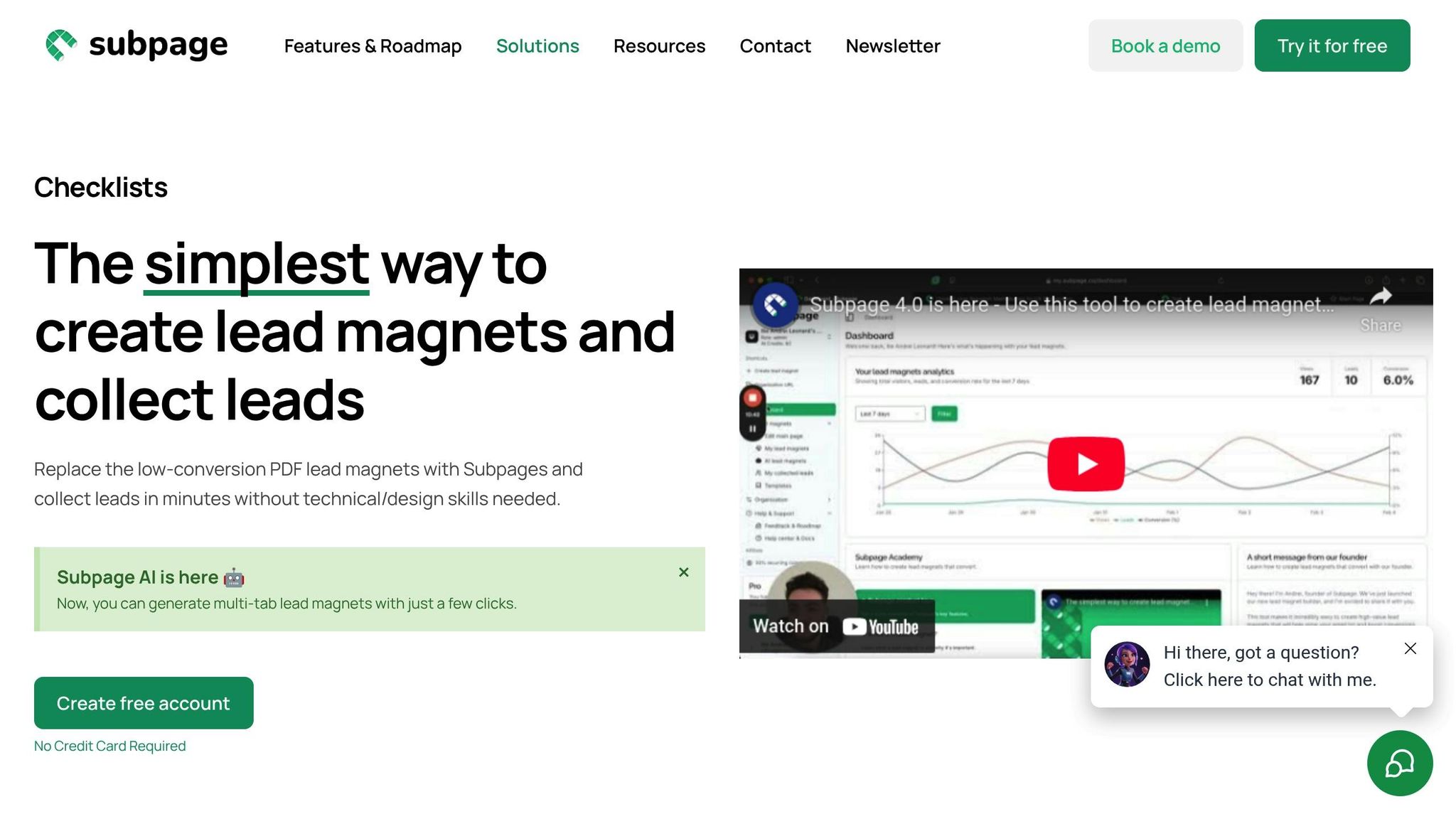
Subpage.co makes organizing tabbed content a breeze. Its AI-powered multi-tab generation and Notion-like editor allow you to structure information effortlessly, even if you don’t have technical expertise. Plus, you can customize branding to match your company’s style, ensuring a polished and cohesive look.
The platform also provides analytics tools to track which tabs get the most attention, helping you refine your content based on real user behavior. With unlimited lead magnets available on the Premium plan ($19/month), you can experiment with different tab flows to discover what resonates best with your audience.
sbb-itb-b3a7196
Lead Capture and Gating Strategies
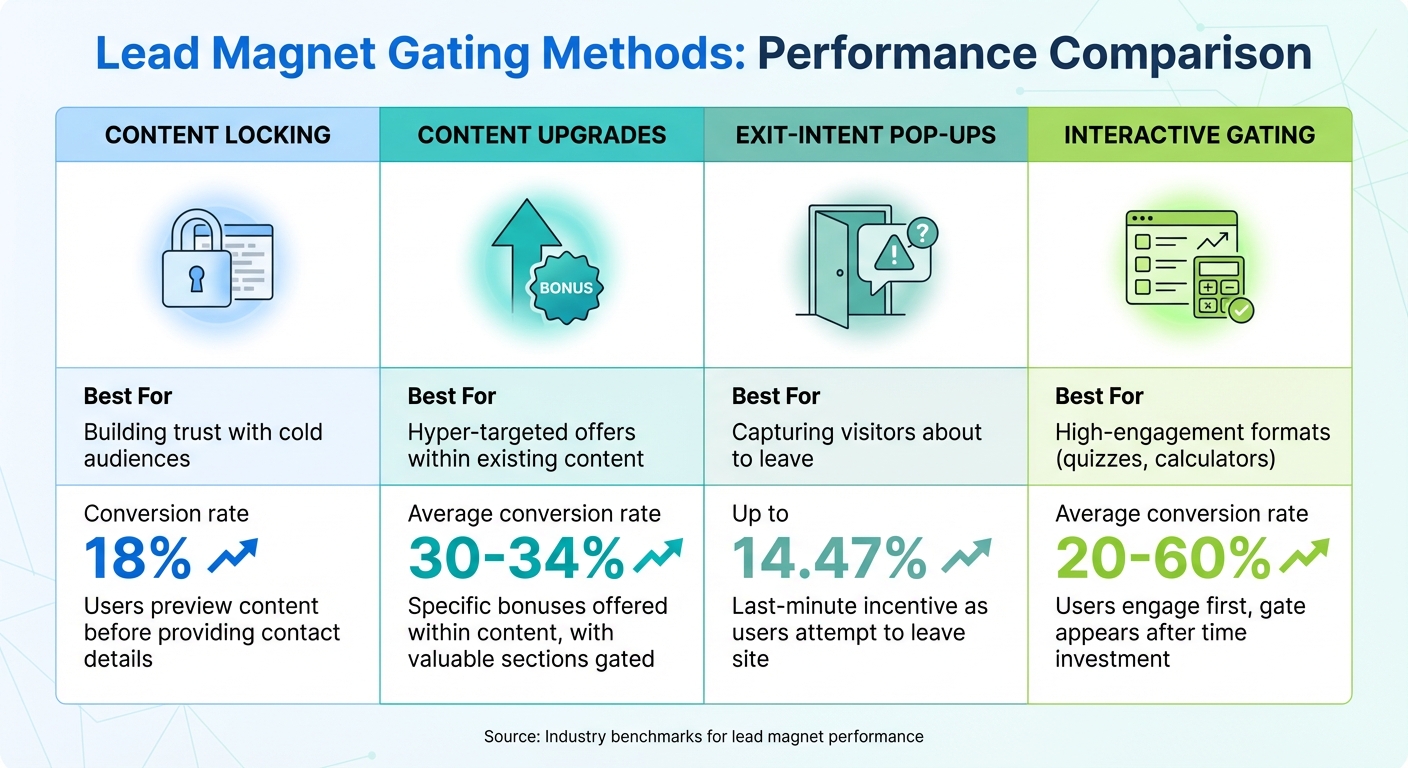
Lead Magnet Gating Methods: Conversion Rates and Best Use Cases Comparison
A well-thought-out gating strategy can significantly improve engagement and boost lead conversions. The key is finding the right balance between protecting your content and providing a smooth user experience.
Choose the Right Gating Approach
Not all gating methods are created equal, and each serves a different purpose. Here are some common approaches:
- Content Locking: This method allows users to preview parts of your content before they hit a gate asking for their contact details. It’s a great way to build trust, as prospects can assess the value of your content before making a commitment.
- Content Upgrades: These are highly specific bonuses offered within existing content. For example, in a multi-tab setup, most tabs might remain accessible while a particularly valuable section is gated behind an email form.
- Exit-Intent Pop-ups: These pop-ups appear just as a user is about to leave your site, offering a lead magnet as a last-minute incentive. While they may feel intrusive, they’ve been shown to achieve conversion rates as high as 14.47%.
- Interactive Gating: Formats like quizzes or calculators engage users by asking for their input first, placing the gate only after they’ve already invested time. These methods can yield conversion rates between 20% and 40%, with some cases even reaching 60%.
| Gating Method | Best For | Average Conversion Rate |
|---|---|---|
| Content Locking | Building trust with cold audiences | 18% (standard landing page) |
| Content Upgrades | Hyper-targeted offers within existing content | 30–34% |
| Exit-Intent Pop-ups | Capturing visitors about to leave | Up to 14.47% |
| Interactive Gating | High-engagement formats (e.g., quizzes) | 20–60% |
Once you’ve selected the right gating method, the next step is to ensure your lead capture forms are as frictionless as possible.
Optimize Lead Capture Forms
The design of your lead capture form plays a critical role in determining whether a visitor converts. Too many fields can discourage users, so simplicity is key. Forms that only ask for an email address and first name often see significantly higher conversion rates. Brian Dean of Backlinko, for instance, increased his conversions nearly ninefold by simplifying his form fields.
For more detailed data collection, progressive profiling can be a game-changer. This method displays only 3–5 fields at a time, asking for additional information on subsequent visits. Multi-step forms, which break the process into smaller chunks, can increase conversions by up to 300%, making them ideal for high-value offers like webinars or consultations.
The complexity of your form should match the value of your offer. For something simple like a checklist, just an email address might suffice. But for more in-depth offers, such as eBooks or newsletters, capturing a name might also make sense. For premium offers like product demos, you might include fields for company size or job title to identify sales-ready prospects. Top-performing forms often achieve conversion rates of 11.45% or higher by minimizing unnecessary fields.
Once your forms are optimized, it’s time to monitor their performance and make data-driven adjustments.
Track Performance with Analytics
Analyzing performance is essential for refining your lead capture strategy. Tools like Subpage.co allow you to track user behavior across your content, helping you identify which tabs draw the most attention, where users drop off, and how many visitors complete your forms.
Key metrics to monitor include:
- Landing Page Conversion Rate: The percentage of visitors who sign up. General benchmarks range from 10% to 30%.
- Click-Through Rates: Useful for assessing engagement after opt-in.
- Behavioral Metrics: Time spent on each tab and drop-off points. If users frequently abandon a specific tab, it might signal a need for shorter content, better visuals, or a revised tab sequence.
Another critical metric is your Cost per Lead (CPL), calculated by dividing your total marketing expenses by the number of leads generated. Understanding your CPL helps you evaluate the financial viability of your lead magnet strategy.
For example, Subpage.co’s Premium plan, priced at $19 per month, offers unlimited lead magnets and comprehensive analytics. This allows you to experiment with various gating approaches without worrying about limitations.
"If you can’t measure it, you can’t improve it. That’s the bottom line." – Tomas, Founder, Entrepedia
Testing and Improving Multi-Tab Lead Magnets
Creating a multi-tab lead magnet is only the first step. The real progress happens when you dive into testing and fine-tuning. By focusing on data-driven adjustments, you can move beyond guesswork and truly boost engagement and conversions. The key lies in testing systematically and keeping an eye on the metrics that matter.
Run A/B Tests for Better Results
A/B testing is a great way to compare two versions of your lead magnet to see which performs better. The trick is to test one variable at a time. For example, if you change the tab order, headline, and call-to-action (CTA) all at once, you won’t know which tweak is responsible for the results. To prioritize what to test, try the ICE Framework, which evaluates ideas based on Impact, Confidence, and Ease. A simple change, like swapping “Get My Free Guide” for “Download Now,” could be a great starting point.
You can experiment with different elements, such as:
- Tab sequence (e.g., leading with benefits instead of a chronological flow)
- Gate placement (showing the form after the first tab versus later)
- Delivery method (instant download versus email delivery)
Make sure to let your test run long enough to reach a 95% confidence level before declaring a winner.
For example, Amanda Stevens boosted her ebook landing page conversion rate by 307% simply by changing her headline from "New Book Reveals Rescue Remedies for Retailers" to a more benefit-focused version.
On the flip side, The Foundation found that removing an action-oriented headline entirely from a video page increased conversions by 28%.
Monitor Key Metrics
Once your tests are underway, tracking the right metrics is essential. Conversion rate is the most important one – it tells you the percentage of visitors who take the desired action. (For reference, the average landing page conversion rate is 6.6%.) Other metrics to watch include:
- Bounce rate: A high bounce rate might mean your ad copy isn’t aligning with your content.
- Engagement metrics: Time on page and scroll depth show how users interact with each tab.
- Lead quality: It’s important to ensure you’re attracting serious prospects, not just freebie hunters.
- Mobile vs. desktop performance: With 83% of landing page visits coming from mobile devices, you’ll want to monitor how your lead magnet performs on different screen sizes.
Here’s a quick breakdown of key metrics:
| Metric | What It Reveals | Action Threshold |
|---|---|---|
| Conversion Rate | Overall effectiveness | Below 6.6% may need improvement |
| Bounce Rate | Content-ad alignment | High bounce rates signal a mismatch |
| Tab Completion | Content engagement | Drop-offs show friction points |
| Mobile vs. Desktop | Device experience | Analyze results separately |
Use these insights to guide your next steps.
Refine Based on Data
Once you’ve gathered your data, it’s time to act on it. If users are abandoning a tab, consider shortening the content or adding visuals to make it more engaging. If your form completion rates are low, try asking for less information – sometimes just a name and email can make a big difference.
To prioritize changes, revisit the ICE Framework. For example, if you’re seeing high bounce rates from cold social media traffic, test switching from a detailed ebook to a quick-win checklist. Research shows that checklists convert at 27%, compared to 24% for ebooks.
Career coach Ashlee Anderson used this approach with her "top ten list" lead magnet, achieving a 32.4% conversion rate and earning $27,000 in passive income from her digital course.
Similarly, the College Board increased its SAT registration conversion rate to 77.38% by adding countdown timers to create urgency.
"The brands that win the most leads aren’t lucky – they’re consistently iterating." – Leadpages
Finally, be patient. Don’t make sweeping changes based on a few days of data. Stick to a predetermined sample size or timeframe to ensure your results reflect real trends rather than random spikes. Tools like Subpage.co’s built-in analytics can help you track everything in one place, making it easier to plan your next round of tests.
Conclusion and Key Takeaways
Creating high-converting multi-tab lead magnets comes down to a few key principles: user-focused design, a clear and logical content flow, and ongoing refinement. The best-performing lead magnets use a consistent design across all tabs, guiding users seamlessly from identifying a problem to discovering a solution – all while delivering immediate value.
Research shows that lead magnets can increase conversion rates by up to 50%. But achieving those results requires more than just putting one together – it demands a deep understanding of user experience.
The move from static PDFs to interactive, multi-tab formats isn’t just a passing trend. It reflects what audiences genuinely prefer. Case studies have shown that adopting interactive formats can significantly increase lead generation while also cutting down production time. The key to this success is treating lead magnets as dynamic tools that evolve with your audience’s needs, rather than as one-and-done projects.
Data-driven strategies are what separate average lead magnets from exceptional ones. While the average landing page converts at 6.6%, top-tier pages hit 30% or more. Marketers who excel at this don’t leave things to chance – they test everything, from the sequence of tabs to where forms are placed, and adjust based on performance metrics. As Leadpages puts it:
"A lead magnet is anything you give away in exchange for someone’s email address or contact information".
The real magic lies in how well you tailor that "giveaway" to your audience’s needs and behaviors.
Platforms like Subpage.co make it easier than ever to build and scale multi-tab lead magnets. With no-code tools, built-in analytics, and seamless email integrations, technical hurdles are removed, letting you focus on crafting content that connects and converts. Businesses using more than 10 landing pages grow their email lists at twice the rate of those with fewer. With the right tools, scaling your lead magnet strategy becomes manageable, not intimidating.
FAQs
Why are multi-tab lead magnets more effective than traditional PDFs?
Multi-tab lead magnets offer an interactive experience that draws users in and encourages them to dive deeper into your content. Unlike static PDFs, these formats allow for real-time data collection, providing you with more precise insights about your audience’s preferences and behaviors. Research indicates that interactive formats can boost both lead-scoring accuracy and conversion rates when compared to traditional PDFs.
On top of that, the multi-tab layout simplifies navigation, helping users quickly locate the information they’re after. This smoother experience doesn’t just leave users more satisfied – it also increases the chances of capturing leads that are more likely to convert.
What’s the best way to organize content in a multi-tab lead magnet?
To create a multi-tab lead magnet that works well, start by organizing your content into logical categories. Each tab should focus on a specific goal or topic, making it easier for users to find what they need. Use straightforward labels like "Checklist" or "Resources" to keep navigation simple and user-friendly. Stick to 3-5 tabs to avoid overwhelming your audience, and ensure the layout remains consistent across all tabs so users stay focused on the content.
Put the most important information in the first tab to grab attention right away. Use visual cues – like bold colors or underlines – to clearly highlight the active tab, helping users stay oriented as they explore. Finally, use analytics to regularly test and tweak your design, ensuring it aligns with user needs and encourages conversions.
What are the best ways to optimize lead capture forms for multi-tab lead magnets?
To make lead capture forms for multi-tab lead magnets more effective, focus on creating a smooth and straightforward experience that encourages users to take action. The key is to keep the form simple, clear, and trustworthy.
Start by keeping it short – only ask for the most essential details. Long forms can feel overwhelming and may drive users away. Use action-focused language in your call-to-action, like "Download the checklist", to clearly communicate what users will get. Place the form in a prominent spot, such as above the fold or on the first tab, so visitors don’t have to hunt for it.
Building trust is equally important. Add a brief privacy statement or a note about data security to reassure users. Make sure the form is mobile-friendly, with a responsive design and large, easy-to-tap buttons for smartphone users. If you need to collect more information, consider breaking the process into smaller, manageable steps using multi-tab forms to make it feel less daunting.
Tools like Subpage’s no-code platform can help you put these strategies into action. With features that let you design mobile-ready forms, include trust signals, and track performance, you can improve your lead capture process without needing technical skills.
Related Blog Posts
