

How Embedded Widgets Improve Lead Collection
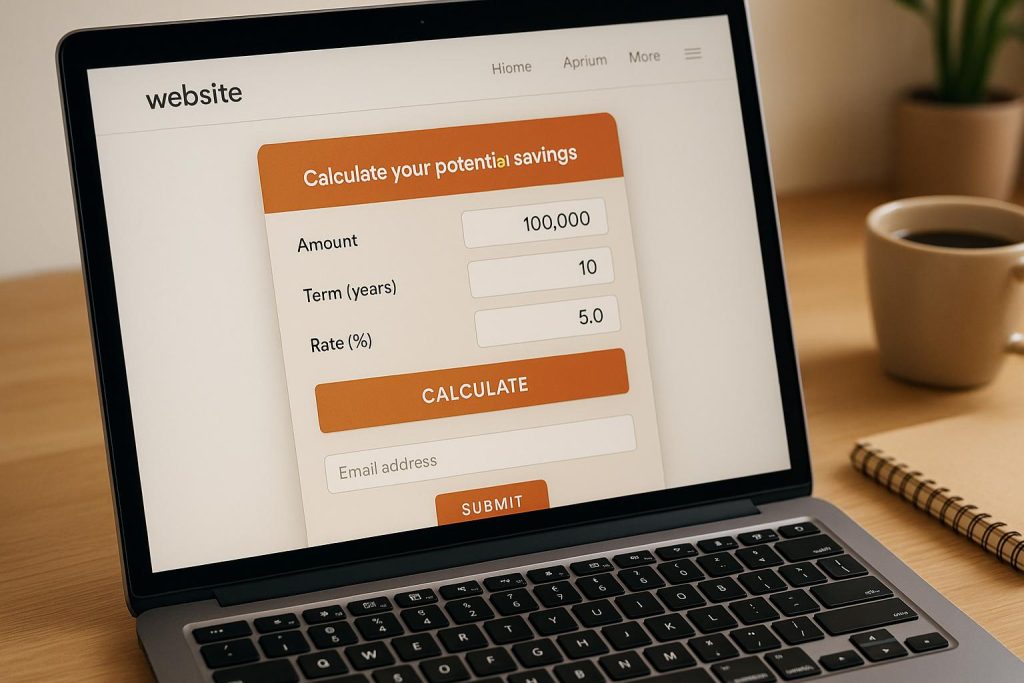
Embedded widgets are transforming how businesses gather leads online by replacing static forms and intrusive pop-ups with interactive tools that offer immediate value. These widgets, such as calculators, assessments, and gated content forms, engage users directly on the page, reducing friction and improving lead quality. Here’s why they work:
- Boost Engagement: Tools like ROI calculators or website audits provide instant, personalized insights, encouraging users to share their contact details.
- Reduce Drop-Offs: Inline widgets eliminate unnecessary steps, keeping users on the same page and streamlining the process.
- Improve Lead Quality: Widgets collect contextual data (e.g., company size, goals) that helps sales teams prioritize high-intent prospects.
- No Coding Needed: Platforms like Subpage.co allow anyone to create and integrate these widgets quickly without technical expertise.
Common Problems With Traditional Lead Collection
Many businesses still depend on static forms, newsletter signups, and pop-ups to gather leads. The problem? These methods often disrupt the user’s experience, ask for information without offering immediate value, and fail to capture the context needed to qualify leads properly.
The result? Visitors abandon forms halfway, provide incomplete data, or leave the page entirely when faced with too much friction. This leads to lower conversion rates, poor lead quality, and inefficiencies in marketing and sales processes.
Low Form Completion Rates
Static forms often miss the mark due to poor timing, bad placement, or a lack of perceived value. Pop-ups that appear too soon or intrusive mobile modals can frustrate users, causing bounce rates to spike.
Form length is another critical factor. Long forms with too many fields discourage users. When visitors see a lengthy form, they often think, "This isn’t worth my time." Placement matters too – forms buried far below the fold get fewer views and even fewer completions. While static forms typically convert just 1–3% of page traffic, interactive tools that provide instant value tend to perform much better.
"I have always missed the ability to include video or forms directly in the lead magnets. With Subpage I can now have an ebook that is truly interactive." – GCG
Even when forms are completed, they often fail to collect the detailed information needed for effective follow-up.
Poor Lead Quality
Basic forms that only ask for a name and email leave sales teams with little to work with. Without details like company size, industry, challenges, or goals, it’s tough to identify high-intent prospects. This lack of context often attracts "freebie seekers" – people who download resources like PDFs with no real buying intent.
The result? Sales teams spend more time nurturing these leads, deal cycles get longer, and customer acquisition costs rise. Teams end up chasing contacts that aren’t a good fit, wasting valuable time and resources.
Redirect processes only make things worse.
High Friction and Visitor Drop-Off
Redirecting users to separate pages to fill out forms adds unnecessary steps that disrupt the flow and increase the likelihood of drop-offs. Every extra step creates an opportunity for users to abandon the process – especially on mobile devices, where switching between tabs is more cumbersome.
For example, a visitor might submit a form, wait for a confirmation email, click a link in that email, and then finally access the promised content. Each step creates friction. In longer B2B buyer journeys, where prospects are researching options or comparing features, such interruptions can derail their actions – whether it’s signing up for a trial, downloading a whitepaper, or requesting a demo.
Embedded widgets solve this problem by capturing leads directly on the page, keeping the user experience seamless and uninterrupted.
How Embedded Widgets Fix Lead Collection Problems
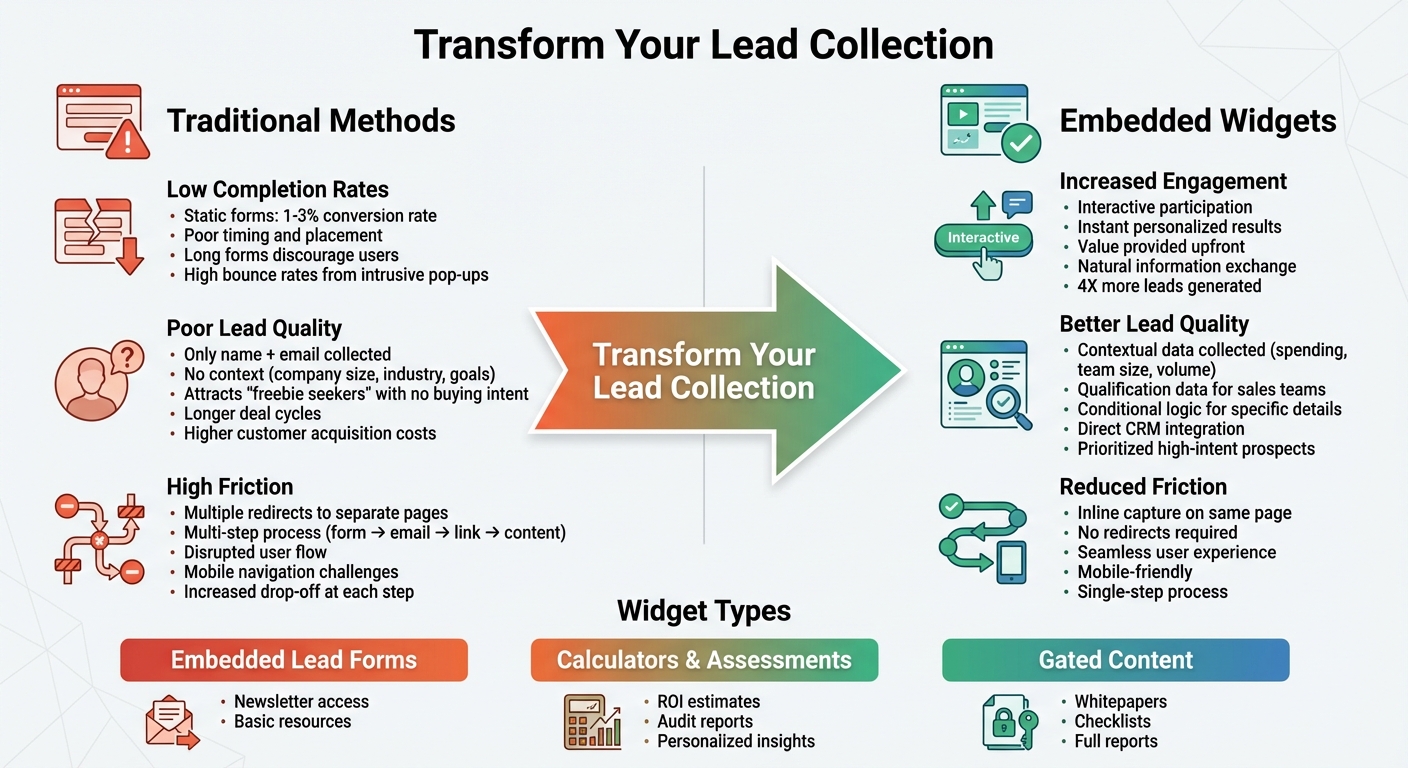
Traditional Lead Collection vs Embedded Widgets Comparison
Embedded widgets turn static web pages into interactive experiences that offer real value. Instead of simply asking visitors to fill out a form with no immediate benefit, tools like calculators, assessments, and audits provide something useful upfront – whether it’s a personalized result, a score, or actionable insights. This approach shifts the dynamic from "give us your email" to "let’s solve your problem together." By engaging users in this way, the request for contact information feels more natural and fair. This sets the stage for deeper interaction, as explored in the sections below.
Increasing Engagement With Interactive Widgets
Interactive widgets succeed because they let visitors actively participate rather than passively consume content. For instance, a SaaS company might offer a savings calculator that shows potential customers how much they could save monthly based on their current expenses. Similarly, an agency could use a website audit tool to analyze a visitor’s domain and generate a mini-report identifying issues like SEO gaps or slow site speeds. A consulting firm might include a maturity assessment quiz that scores users from 0–100 and categorizes them as beginner, intermediate, or advanced, along with tailored recommendations.
These tools create a feedback loop: users input their data, receive instant, relevant results, and are more likely to engage further. By addressing the engagement challenges of static forms, these widgets motivate users to take the next step. Agencies have reported that providing instant, personalized reports significantly increases prospect interest and action rates.
Reducing Friction With Inline Lead Capture
Once engagement is improved, keeping the process smooth is key. Embedded widgets capture leads directly on the same page, eliminating unnecessary steps that might cause users to abandon the process. By integrating these widgets seamlessly into blog posts, pricing pages, or service descriptions, they feel like a natural extension of the content. This inline approach ensures visitors stay in control, making them more likely to complete the form.
"The embedding options are also a highlight. Being able to drop in videos, forms, or other interactive elements directly into a page is really handy, and it all works seamlessly." – CharlesDraven
Improving Lead Quality With Contextual Data
Embedded widgets don’t just collect contact information – they gather detailed, contextual data that helps sales teams understand prospect needs. For example, an ROI calculator might ask for inputs like current spending, team size, or monthly volume. This information doubles as qualification data, helping sales teams prioritize leads. Similarly, an assessment widget can use conditional logic to gather even more specific details. If a visitor indicates their company has over 100 employees, the widget might ask about their budget or existing tools. If they score low on SEO, it could inquire about their current provider.
This deeper level of insight ensures that leads are not only captured but also qualified. The data flows directly into your CRM, allowing sales teams to segment leads by urgency, needs, and potential fit. This makes it easier to focus on high-priority opportunities and tailor outreach from the very first interaction.
For teams aiming to implement this strategy quickly, platforms like Subpage.co offer a streamlined way to create gated content pages – such as whitepapers, checklists, or business cases – paired with embedded opt-in widgets. These tools require no coding or design expertise and come with built-in analytics and integrations, so you can track which widgets perform best and sync new leads directly to your CRM or email systems.
Types of Embedded Widgets for Lead Generation
Embedded widgets are a great way to simplify the lead generation process while boosting the quality of the leads you collect. These tools are designed to meet different goals, from capturing quick email signups to offering tailored insights. Among the most effective options are embedded lead forms, calculators and assessments, and gated content widgets. Each offers a unique way to engage visitors and turn casual browsers into solid leads.
Embedded Lead Forms and Opt-Ins
Embedded lead forms, often simple opt-in boxes, make it easy to collect email addresses directly from your site. These forms are usually placed within blog posts, product pages, or resource sections, asking for minimal information – like just an email address – in return for something of value, such as access to a newsletter or a downloadable resource.
For example, embedding a newsletter signup form within an article can help grow your subscriber base by offering exclusive content right away. Unlike pop-ups or top bars, inline forms feel more natural and less intrusive. In fact, tools that combine these forms with high-value offers have been shown to generate 4X more leads, making the exchange worthwhile for visitors. This seamless integration keeps the user experience smooth and engaging.
Calculators and Assessment Tools
Interactive widgets like ROI calculators, website audits, or maturity assessments offer personalized results in exchange for contact details. These tools ask users to input specific data – such as their current spending, business size, or goals – and instantly provide tailored insights, such as cost-saving estimates, performance scores, or actionable recommendations.
Take My Web Audit‘s embeddable tools, for example. They let agencies add AI-powered website analysis features to their sites. A visitor can input their domain and quickly receive a report highlighting SEO gaps, speed issues, and optimization opportunities. Similarly, HighLevel‘s Prospecting Widget delivers instant business audits, covering listing accuracy and SEO performance, while automatically feeding leads into dashboards for follow-up. These tools not only qualify leads but also showcase immediate value, making them highly effective.
Gated Content Widgets
Gated content widgets are a smart way to offer previews of premium resources – like whitepapers, checklists, or case studies – right on your site. Instead of redirecting users to a separate landing page, these widgets require visitors to provide their email to unlock the rest of the content. This inline approach keeps users engaged and minimizes the risk of losing them.
For instance, you could display the opening sections of a whitepaper or the introduction to a detailed checklist, then prompt users to fill out a form to access the full resource. Tools like Subpage.co make it easy to create interactive lead magnets with embedded opt-in forms – no coding required. Teams can build ebooks with features like embedded videos, forms, or chat buttons, allowing users to download attachments or follow additional links after entering their details. By offering partial value upfront, this method builds trust and encourages users to share their contact information.
| Widget Type | Primary Use Case | Value Exchange |
|---|---|---|
| Embedded Lead Forms | Quick email capture | Newsletter access, basic resources |
| Calculators & Assessments | Personalized insights | ROI estimates, audit reports |
| Gated Content | Access to premium resources | Whitepapers, checklists, full reports |
sbb-itb-b3a7196
Best Practices for Using Embedded Widgets
Placement and Timing
Where you place a widget can be just as important as how it works. A great spot is mid-content – right after offering some value or addressing a key issue. For instance, if your article touches on ROI challenges, placing a calculator widget right afterward lets readers act while the topic is still top of mind.
End-of-content placement is another effective option, especially for readers who finish your article and are ready to take the next step. However, avoid placing widgets too early; wait until users are engaged with your content. For example, HighLevel’s Prospecting Widget, positioned after discussing business challenges, provides online presence reports that capture leads at the moment of peak interest.
Exit-intent triggers can also work well, but don’t overdo it. Too many pop-ups or overlays can feel intrusive and harm the user experience. Make sure your widgets are mobile-friendly and match the design of your site to keep things smooth and user-friendly. These strategies align with the seamless, inline methods mentioned earlier.
Data Privacy and Compliance
While boosting engagement with widgets, it’s essential to prioritize user trust by being transparent about data privacy. Always get explicit consent before collecting user information. Use opt-in checkboxes with clear, simple language explaining how the data will be used, and include privacy notices near the widgets. This approach not only builds trust but also ensures compliance with regulations like GDPR and CCPA.
Follow U.S. data privacy rules, such as CAN-SPAM and CCPA, by using straightforward opt-in methods. Start small – ask for just an email address rather than overwhelming users with long forms. Tools with built-in consent and compliance features can help maintain a smooth experience while keeping you aligned with legal requirements.
Tracking Performance and Optimizing Widgets
To improve your lead capture strategy, you need to monitor how your widgets perform. If you don’t measure it, you can’t improve it. Focus on metrics like completion rates, conversion rates, engagement duration, and lead quality. My Web Audit reports a 4X increase in leads by using analytics to fine-tune widget performance, enabling smarter adjustments based on data.
Connect widgets to tools like Google Analytics or use built-in tracking features to gather insights. Integrating them with your CRM via Zapier or webhooks ensures leads flow directly into your sales pipeline. Platforms like Subpage.co provide built-in analytics to track interactions and lead collection.
A/B testing is a powerful way to optimize widgets. Experiment with different button colors, the number of fields, or placements – such as mid-page versus footer – to see what works best. For example, if asking for multiple fields reduces completion rates, simplify it to a single-field opt-in. Agencies using My Web Audit regularly analyze widget configurations to find what generates the highest-quality leads, making tweaks that shorten sales cycles and improve results. Keep an eye on drop-off points in your dashboards to identify friction and adjust based on the data.
| Best Practice | Key Metrics to Track | Optimization Tip |
|---|---|---|
| Placement & Timing | Engagement rate, bounce rate | Test mid-content vs. footer placements |
| Data Privacy | Consent rate, opt-out rate | Include clear privacy links |
| Performance Tracking | Completion rate, lead quality score | Connect widgets to your CRM for alerts |
Conclusion
Embedded widgets turn static pages into dynamic, interactive experiences that outperform traditional forms and generic pop-ups. These tools – like calculators, audits, assessments, or gated content – offer immediate value, keeping visitors engaged without requiring them to navigate away. They simplify the process, reduce friction, and gather richer, more actionable data. More engagement, fewer barriers, and better-qualified leads give your sales team the insights they need to prioritize outreach and close deals faster. Start integrating these tools now to see the difference.
For businesses in the U.S., these tools can streamline lead capture and improve sales efficiency. Embedded widgets provide a modern, effective way to gather leads while offering behavioral insights and context from the very first interaction. For example, when a prospect uses an ROI calculator or receives a personalized audit, your follow-up can be highly targeted, timely, and relevant – helping to shorten sales cycles and increase close rates.
Subpage.co makes implementing these strategies simple and low-risk. The platform allows you to easily create and deploy embedded lead experiences like whitepapers, checklists, business cases, and other gated content. With built-in analytics, lead capture, and seamless integrations with CRMs and email tools, all the data flows directly into your existing systems. This means you can monitor performance and refine your approach over time. Whether you’re running a marketing agency, a SaaS company, or a content-focused business, Subpage.co bridges the gap between planning and execution – helping you transform your lead collection strategy with ease.
FAQs
How do embedded widgets help collect better leads than traditional forms?
Embedded widgets make collecting leads easier and more interactive by blending smoothly into your content. Unlike old-school forms that can feel clunky or interruptive, these widgets keep the experience flowing naturally, encouraging visitors to engage without breaking their focus. The result? You gather more precise and relevant details from your audience, leading to higher-quality leads.
By minimizing friction and reducing the chances of users abandoning the process, embedded widgets help keep potential leads engaged from start to finish. Plus, the detailed information they capture gives businesses deeper insights into their audience, making it easier to craft personalized and effective follow-ups.
What are some examples of interactive widgets for collecting leads?
Interactive widgets are an excellent way to connect with visitors while collecting their contact details. For instance, forms can help gather essential information, while quizzes and surveys create a more engaging experience. Chatbots offer real-time interaction, making communication feel immediate and personal. Additionally, embedded call-to-action buttons can prompt users to take specific steps, such as signing up for a newsletter or downloading a resource. These tools add a dynamic touch to lead collection, making it both engaging and efficient.
How can businesses protect user data when using embedded widgets?
When using embedded widgets, safeguarding user data should be a top priority. One of the most effective ways to do this is by implementing encryption to secure data during transmission. This not only protects sensitive information but also ensures compliance with privacy regulations like GDPR and CCPA. Transparency is equally important – having clear and accessible privacy policies helps establish trust with users.
It’s also crucial to empower users by giving them control over their data. This includes options to opt out, request data deletion, or manage their preferences. On top of that, businesses should perform regular audits to uncover and address any vulnerabilities. By taking these proactive steps, companies can better protect user information and uphold responsible data practices.
Related Blog Posts
