

Top 7 No-Code Tools for Lead Magnet Creation

Need a no-code lead magnet tool fast? Here’s the short answer: if you want built-in gating, lead forms, and basic analytics in one place, I’d look first at Subpage.co and Beacon. If you want PDF design, I’d use Canva. If your lead magnet is a quiz, calculator, or assessment, I’d focus on Typeform or Outgrow.
This list covers 7 tools: Subpage.co, Canva, Beacon, Typeform, Notion, Outgrow, and LeadCreator. I’d compare them on four things: format support, gating, integrations, and price. The biggest split is simple: some tools are for static PDFs, while others are for interactive, browser-based lead magnets that are often easier to use on mobile and easier to update later.
Here’s the article in one glance:
- Subpage.co: best for gated whitepapers, checklists, and content pages
- Canva: best for making the asset, not the opt-in flow
- Beacon: best for all-in-one PDF-style lead magnets with built-in forms
- Typeform: best for quizzes, surveys, and multi-step lead gen flows
- Notion: best for shareable resource hubs that change often
- Outgrow: best for calculators, quizzes, and lead qualification
- LeadCreator: best for hosted PDF lead magnets behind an email gate
Price starts at $0/month for several tools, while paid plans in this group begin around $15 to $25/month, with some options at $49+ for added logic, team use, or more gating and routing features. The article also points out that free plans often limit analytics history to 7 days, and that Zapier connects with 5,000+ apps, which matters if you need leads to move into your CRM.
Quick Comparison
| Tool | Best For | Built-In Gating | Main Formats | Entry Price |
|---|---|---|---|---|
| Subpage.co | Gated content pages | Yes | Whitepapers, checklists, eBooks (or create a checklist lead magnet with AI) | Free |
| Canva | Visual asset design | No | PDFs, guides, presentations | Free |
| Beacon | All-in-one PDF lead magnets | Yes | eBooks, workbooks, libraries | Free |
| Typeform | Interactive lead magnets | Yes | Quizzes, surveys, forms | Free |
| Notion | Shareable content hubs | No | Guides, checklists, docs | Not listed in source |
| Outgrow | Calculators and assessments | Yes | Calculators, quizzes, polls | Not listed in source |
| LeadCreator | Hosted gated PDFs | Yes | PDF eBooks, guides, checklists | Not listed in source |
Bottom line: I’d pick the tool based on what you’re making first, then check how you want to gate it, where the leads need to go, and what you want to spend each month.
sbb-itb-b3a7196
What to Look for in a No-Code Lead Magnet Tool
Use four filters to compare tools: format, gating, integrations, and price.
Lead magnet formats the tool supports
Start with the format you need. That should shape your tool choice more than anything else.
Some tools work best for PDF-style documents. Others are made for interactive, web-based lead magnets.
Static PDFs can be a pain to update, and they’re less friendly on mobile because readers have to download them. Interactive, browser-based lead magnets are easier to use on phones, can be updated in real time, and usually give you better analytics. If most of your audience is on mobile, that gap matters.
Built-in lead capture and gating
Look for built-in forms, pop-ups, or gating so you don’t have to bolt on another tool.
It also helps to check how much control you get over gating. Common options include full-page gating, partial-page gating, and section-level gating. Partial gating often works well for long-form content because readers get a taste of the value before they hand over their info.
Analytics, integrations, and export options
Built-in analytics help you see which lead magnets convert and which ones fall flat.
Free plans often limit reporting history to 7 days. Paid plans usually give you longer tracking windows, which makes trend spotting a lot easier.
For workflow setup, look for Zapier support, webhooks, or native CRM connections. Zapier connects to over 5,000 apps. At the bare minimum, the tool should let you export leads as a CSV so you can move data by hand if needed.
Pricing by budget range
| Budget Range | What You Typically Get |
|---|---|
| Free / $0/month | About 5 lead magnets, 1 user, 7-day analytics history, basic or no integrations |
| $19–$20/month | Unlimited lead magnets, custom domain, whitelabeling, Zapier/webhooks |
| $50+/month | Advanced logic, team collaboration, extended template libraries |
Whitelabeling is usually locked behind a paid plan, so it’s smart to account for that early when setting your budget.
Use these criteria to compare the seven tools below.
1. Subpage.co
Subpage.co is built for content-led lead magnets like whitepapers, checklists, business cases, and gated pages. Here’s what it supports.
Supported lead magnet formats
Subpage uses a block-based editor, so you can build lead magnets without design or coding skills. It supports whitepapers, checklists, business cases, eBooks, resource guides, and multi-tab gated content pages.
You can also paste content straight from Google Docs or Microsoft Word, and Subpage turns it into its native block format.
Lead capture and gating options
Subpage supports full-page gating, partial-page gating, and block-level gating.
For lead capture, it includes built-in forms, pop-ups, and top bars.
Integrations and analytics
The analytics dashboard shows visitors, views, and conversion metrics.
You can export leads as CSV or sync them through Zapier, webhooks, and third-party plugins on Premium.
Pricing in USD
Pricing is simple:
| Feature | Free Plan | Premium Plan ($9.99/organization/month) |
|---|---|---|
| Lead Magnets | Up to 5 | Unlimited |
| Analytics & Lead History | 7 days | Unlimited |
| Branding | Subpage branding | Whitelabel (no branding) |
| Integrations | Basic | Zapier, webhooks, third-party plugins |
2. Canva
Canva is a design tool for polished visual assets. It’s a go-to option for marketers who want clean, professional-looking materials without needing design chops.
Supported lead magnet formats
Canva works best when the lead magnet asset is the main focus, not the sign-up flow around it. It’s a strong fit for static formats like PDF lead magnets, checklists, and slide-style resources. And because Canva has a large template library, you can put these together fast.
Lead capture and gating options
Canva does not come with built-in lead capture or content gating. You can export your finished file as a PDF or share it with a view-only link.
If you want to collect emails before someone gets the asset, you’ll need a separate form or landing page. In plain English: use Canva to make the lead magnet, then pair it with another tool for the capture step.
Integrations and analytics
Canva has no built-in analytics or lead capture integrations.
Pricing in USD
| Plan | Price |
|---|---|
| Free | $0/month |
| Canva Pro | $15/month per person |
| Canva Teams | $10/month per person (minimum 3 people) |
3. Beacon
Beacon is built for marketers who want to create and gate lead magnets in one tool.
Supported lead magnet formats
Beacon supports ebooks, checklists, workbooks, and resource libraries. The resource library feature lets you gate a group of assets behind one opt-in form. That’s a strong fit when you want the asset and the signup flow in the same place.
Lead capture and gating options
Beacon also comes with built-in lead capture and gating. You get built-in forms like inline forms, pop-ups, horizontal bars, and entry overlays. Users can gate content with an email form and then send the lead magnet automatically after submission.
There’s also a Link Lock feature that gates any existing URL or page on a website.
Integrations and analytics
Beacon integrates with major email marketing platforms and CRMs. It also supports Zapier for broader workflow automation. The analytics dashboard tracks form submissions and lead magnet performance.
Pricing in USD
| Plan | Price |
|---|---|
| Free | $0/month |
| Pro | $19/month |
| Growth | $49/month |
4. Typeform
Use Typeform when the lead magnet is the experience.
Supported lead magnet formats
Typeform works well for interactive lead magnets like quizzes, surveys, assessments, and multi-step forms. It shows one question at a time, which helps keep people engaged and cuts down on form fatigue. Quizzes, in particular, can hold attention and deliver personalized results, so the quiz or assessment becomes the asset itself, not just the form wrapped around it.
Lead capture and gating options
Typeform’s conversational flow makes it simple to collect contact details like email, name, and company size. Logic Jumps let you control the path based on a person’s answers and reveal the result only after they finish. That means you can handle both engagement and lead capture in the same flow.
Integrations and analytics
It also needs to fit into your email and CRM setup without a headache. Typeform connects natively with major email platforms and CRMs, and it also supports Zapier for more automation. Its analytics dashboard shows completion rates and drop-off points, and you can export responses as a CSV.
Pricing in USD
| Plan | Price |
|---|---|
| Free | $0/month |
| Basic | $25/month |
| Plus | $50/month |
| Business | $83/month |
5. Notion
Notion is a flexible workspace for simple, shareable lead magnets. It fits best when your lead magnet needs regular updates and easy sharing.
Supported lead magnet formats
Notion works well for resource hubs, guides, checklists, and other living documents that need quick edits. That makes delivery simple. But if you want to control who gets access, you’ll need outside tools.
Lead capture and gating options
Notion doesn’t include built-in lead capture or partial/block gating. So if you want to gate content, you have to set that up with third-party tools. Put simply, Notion supports the asset, not the funnel.
Integrations and analytics
Notion doesn’t offer native lead analytics. Tracking and automation depend on third-party tools.
Pricing in USD
Pricing matters less here than workflow fit, since Notion works best as a content hub. Pricing information was not provided in the source material.
6. Outgrow
If you want interactive lead magnets that do more than collect emails, Outgrow is a strong fit. It’s built for interactive experiences that help qualify leads while people engage with your content.
Supported lead magnet formats
Outgrow supports calculators, personality quizzes, graded assessments, polls, surveys, and product recommendation tools. That gives you a lot of room to match the format to the buyer’s stage.
For example, calculators can help deal with price objections when someone is close to making a decision. Quizzes and assessments can help score leads and tailor results based on what each person says.
Its main draw is simple: it combines the interactive experience, lead capture, and lead routing in one flow.
Lead capture and gating options
Outgrow includes built-in lead capture forms that you can place at the start, in the middle, or at the end of an interactive experience. It also uses logic jumps to send users to different questions or results based on their answers.
That means the path can change as the person moves through the experience, which helps you collect better data without making the flow feel clunky.
Integrations and analytics
Integrations and analytics are not specified in the source material.
Pricing in USD
Pricing is not specified in the source material.
7. LeadCreator
LeadCreator helps you turn template-based content into gated PDF lead magnets. It’s a fit for marketers who want downloadable PDFs without getting pulled into design work.
Supported lead magnet formats
LeadCreator supports PDF ebooks, checklists, and guides. Its template-driven workflow turns content into polished PDFs, and it also includes ebook cover support.
Lead capture and gating options
LeadCreator puts PDFs behind an email opt-in and delivers them through a hosted landing page.
Integrations and analytics
Integration and analytics details aren’t confirmed in the available sources, so it’s best to check the current documentation.
Pricing in USD
Pricing isn’t confirmed in the available sources. Check LeadCreator’s website for current plans and pricing.
Next, compare LeadCreator with the other tools by format, gating, and price.
Feature and Pricing Comparison Table
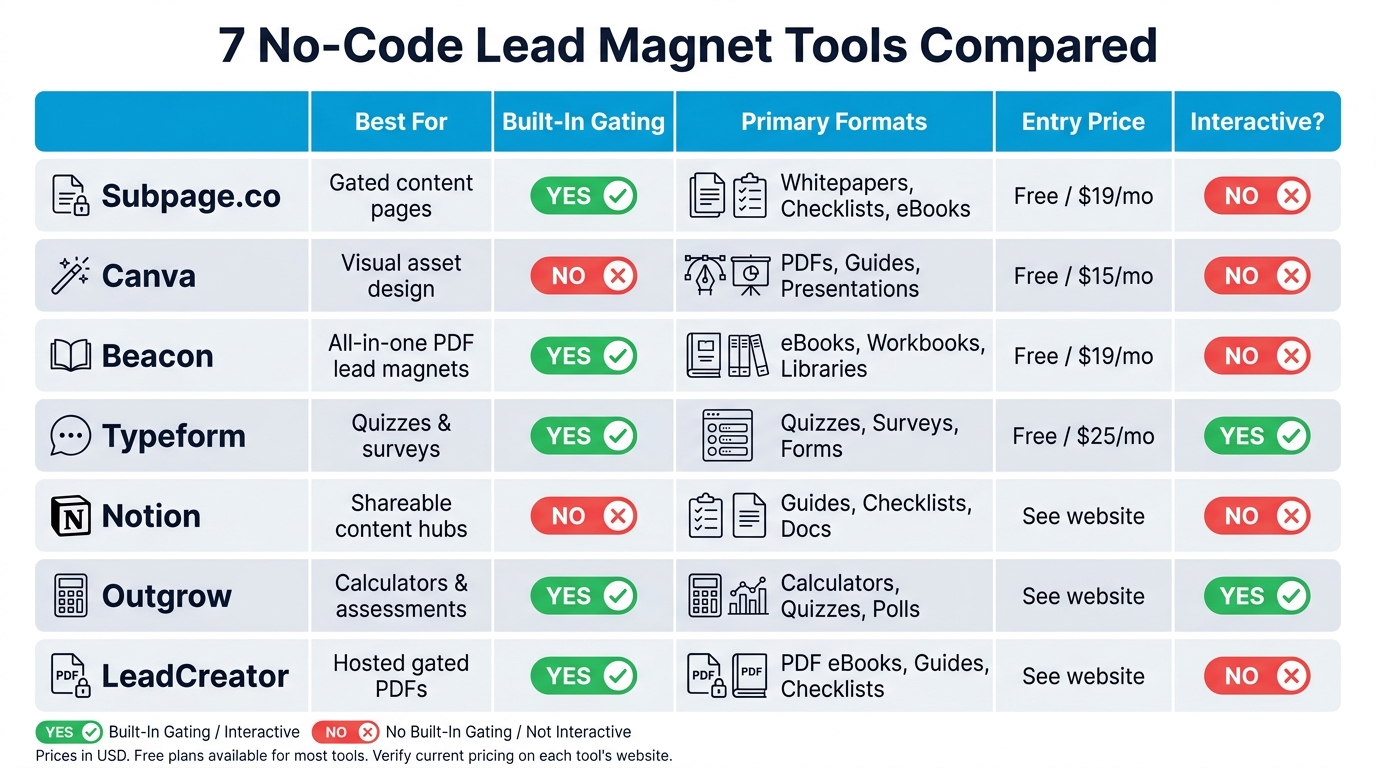
7 No-Code Lead Magnet Tools Compared: Features, Gating & Pricing
Use the comparison below to map each tool to format, gating, and budget.
This table gives you a quick side-by-side look at all seven tools.
| Tool | Primary Formats | Lead Capture / Gating | Integrations / Best Fit | Pricing (USD) |
|---|---|---|---|---|
| Subpage.co | Gated pages, checklists, whitepapers, eBooks | Full, partial, and block-level gating; forms, pop-ups, top bars | Zapier, webhooks, third-party plugins; whitelabeling; block-based editor | Free; Premium $9.99/mo per organization |
| Canva | PDFs, eBooks, presentations | External integration required | Design templates, drag-and-drop UI; best for asset creation only | Free; Pro $15/month per person; Teams $10/month per person (min. 3 people) |
| Beacon | eBooks, checklists, workbooks, resource libraries | Built-in forms, pop-ups, bars, entry overlays; Link Lock for URL gating | Zapier, major email platforms and CRMs; analytics dashboard | Free; Pro $19/month; Growth $49/month |
| Typeform | Quizzes, surveys, assessments, multi-step forms | Conversational flow with Logic Jumps; email capture built in | Zapier, native CRM and email integrations; CSV export | Free; Basic $25/month; Plus $50/month; Business $83/month |
| Notion | Resource hubs, guides, checklists, living documents | No built-in gating or lead capture; requires third-party tools | Third-party dependent; best for content delivery, not capture | See Notion’s website for current pricing |
| Outgrow | Calculators, quizzes, assessments, polls, product recommendations | Built-in lead capture forms; Logic Jumps for branching paths | See Outgrow’s website for current integrations | See Outgrow’s website for current pricing |
| LeadCreator | PDF eBooks, checklists, guides | Email opt-in gate; hosted landing page delivery | See LeadCreator’s website for current integrations | See LeadCreator’s website for current pricing |
A few patterns stand out fast. Subpage.co and Beacon are better if you want built-in gating for lead gen content. Canva works well for making the asset itself, but you’ll need something else to collect leads. Typeform and Outgrow lean more interactive, which makes sense if your lead magnet is a quiz, calculator, or assessment instead of a static PDF.
On the other hand, Notion is better for sharing content than locking it behind a form. And LeadCreator keeps things simple if your goal is a hosted PDF lead magnet with an email gate in front of it.
How to Pick the Right Tool for Your Lead Magnet Goals
Use the table to narrow your options. Then choose based on format, gating, workflow, and integrations.
Match the tool to your lead magnet format
Start with the format first. That one choice will rule out a lot of tools fast.
Subpage.co works well for whitepapers, checklists, business cases, and gated resource pages. It’s a strong fit for teams that already draft in Google Docs and want a smoother path from draft to published asset.
If you’re making visual PDF guides or design-heavy assets, Canva makes more sense. It leans into design freedom and ready-made visual templates.
Consider your lead capture needs
If your main goal is email capture and conversion tracking, built-in gating shouldn’t be optional.
Look for tools that support:
- Full-page gating
- Partial gating
- Block-level gating
That gives you room to match the gate to the value of the asset. A short checklist might need a lighter touch. A deep guide or business case may call for a stronger gate.
Factor in your team’s workflow
This part gets overlooked all the time, and it can slow a team down more than people expect.
Content teams usually move faster in doc-style editors, especially when pasted formatting stays intact. Design teams tend to prefer drag-and-drop canvases where layout control is front and center. Operations teams should care less about looks and more about where form submissions go, how leads get routed into the CRM, and whether analytics are easy to read.
Check integration and branding requirements
If leads need to move straight into your CRM or kick off a welcome sequence, check for Zapier support or direct webhooks before you decide. It’s the kind of detail that seems small at first, then turns into a headache later.
Subpage.co’s Premium plan includes custom subdomains, white-labeling, and full integrations for $9.99/month per organization.
Those four checks usually make the choice pretty simple.
Conclusion
After looking at formats, gating control, integrations, and price, the best pick usually comes down to three things: format, gating control, and budget.
For whitepapers, checklists, business cases, and gated content pages, Subpage.co fits teams that want creation, gating, analytics, and integrations in one no-code workflow. Put simply, it works well as the default choice for teams that want a no-code lead magnet workflow without adding extra tools.
Start with format. Then check gating and integrations.
FAQs
Should I choose a PDF or an interactive lead magnet?
It depends on your goals. PDFs are common, but they’re static and harder to update or track.
Interactive lead magnets tend to get more engagement. They’re easier to update, give you more control over gating, and usually come with better analytics and integrations.
If you want a more dynamic asset built to drive conversions, interactive is often the better pick.
What type of gating usually converts best?
It comes down to fit: how well the content lines up with what your audience wants and where they are in the buyer journey.
In many cases, quizzes and assessments convert the best, with reported rates of 20% to 40%. That’s a big reason marketers keep coming back to them. They’re easy to engage with, and they give people something personal in return.
For top-of-funnel prospects, simpler formats like checklists or templates often do the job well. They’re fast to use and low-commitment.
As leads move into the middle or bottom of the funnel, more in-depth resources tend to work better. That usually means things like eBooks, case studies, or webinars.
How do I send leads from my lead magnet into my CRM?
Use Subpage integrations with automation tools like Zapier to send new leads straight to your CRM. If you need leads delivered in real time, you can also use webhooks or tools like Active Pieces.
If you’d rather keep things manual, you can export your leads as a CSV.
Related Blog Posts
