

5 Benefits of Integrating CRM with Lead Scoring

If your CRM and lead scoring work together, your team can respond faster, sort leads better, and forecast revenue with less guesswork. In the article, I’d boil it down to this: teams that connect scoring to CRM records can move hot leads to sales right away, keep sales and marketing on the same page, and handle more leads from content-led lead magnets without adding more manual work. The article also points to results like 26% higher conversion rates, 38% better close rates, and forecast accuracy moving from 65% to 85%.
Here’s the short version of what matters most:
- Lead prioritization gets clearer because reps can sort by fit, intent, and recent activity.
- Follow-up gets faster because the CRM can assign leads and create tasks the moment a score passes a set mark.
- Sales and marketing use the same rules for what counts as sales-ready.
- Forecasting gets tighter because score bands add more context than pipeline stage alone.
- Lead management scales better because routing, scoring, and assignment happen automatically.
What stood out to me is that this is not just about adding a score to a contact record. It’s about turning that score into action: assign the lead, alert the rep, set the deadline, and track what happens next.
Lead Scoring Tutorial for Zoho CRM
sbb-itb-b3a7196
Quick Comparison
| Area | What changes when CRM and lead scoring are connected |
|---|---|
| Prioritization | Reps work the best-fit leads first |
| Follow-up | High-score leads move to sales in minutes, not hours |
| Team alignment | Marketing and sales share one definition of lead quality |
| Forecasting | Revenue estimates use score data, not stage alone |
| Scale | More leads can move through the system with less manual review |
If I were setting this up, I’d start with three steps: send lead data from interactive magnets into the CRM, set score thresholds, and automate routing and follow-up. From there, I’d track time to first touch, conversion by score band, and forecast accuracy over 30, 60, and 90 days.
How CRM and Lead Scoring Work Together
A CRM keeps prospect details and engagement history in one place. Lead scoring adds a second layer by assigning points based on fit data, like company size or industry, and behavior data, like page visits, email clicks, and demo requests. When the two are connected, the score sits on the CRM record and shows the team when to qualify, route, or follow up.
Three things matter most: where the score shows up, how teams use it, and how leads move into the workflow.
How Score Data Appears in Contact and Account Records
A lead score can appear right inside the CRM record, next to recent activity. When a rep opens a contact or account profile, they can see the lead’s status right away instead of jumping between tools and stitching the story together by hand.
That makes the next step much clearer. The rep can decide whether to call now, follow up later, or move the lead into another pipeline stage. And because both teams are looking at the same record, there’s less guesswork and less back-and-forth.
How Marketing and Sales Use the Same Qualification Signals
Without shared rules, marketing and sales often mean different things when they say a lead is “good.” One team may look at engagement. The other may care more about buying intent or company fit.
A connected CRM and scoring setup fixes that by giving both teams the same qualification signals, with one threshold for sales readiness. Once a lead crosses that line, the handoff is visible to everyone at the same time. No mixed signals. No “I thought your team was handling it” moments. Just a cleaner process.
How Lead Capture Connects to Scoring Workflows
At the top of the funnel, lead magnets can feed straight into the same CRM-and-scoring setup. With Subpage.co, teams can create gated whitepapers, checklists, business cases, and other lead magnets without technical work, then send submissions into CRM workflows through Zapier or Make.com.
Scoring can happen during the transfer, which means leads can be qualified before they enter the CRM or as soon as they arrive. From there, the system can route the lead to the right owner or pipeline and trigger follow-up tasks or internal alerts.
That speed matters a lot. A lead is 21x more likely to qualify when contacted within 5 minutes than after 30 minutes. Direct capture makes that 5-minute follow-up window much easier to hit.
1. Better Lead Prioritization
Once scores sit inside the CRM, the first win is pretty simple: reps can see who to work first.
Instead of handling leads in the order they came in, reps can sort by fit and intent. That changes the day-to-day workflow in a big way. A best-fit, high-intent lead who asked for a demo in the last 24 hours and passed a set score threshold should go straight to the top of the queue. Studies show lead scoring improves conversion rates and lowers qualification cost.
Score thresholds also help the CRM do some of the heavy lifting. When a lead passes a set score, like 75 out of 100, the CRM can change the lead status to Sales Qualified Lead (SQL), route it to the right rep by territory, and create a follow-up task with a 2-hour deadline. You can also combine triggers to flag hot leads faster, like a score above 60 plus a visit to the pricing page.
Score bands make the picture even clearer. For example:
- 0–40: lower-priority leads
- 41–70: mid-range leads worth watching
- 71–100: top-priority leads
That kind of setup makes it easier to spot where the strongest opportunities sit, so reps spend time on lead quality, not just volume. High-quality leads are often captured through content-focused lead magnets that signal strong intent.
2. Faster Sales Follow-Up
When lead scoring lives inside the CRM, hot leads can move from lead generation form fills to rep alert in minutes instead of hours. That changes the pace of follow-up. The issue usually isn’t rep effort. It’s the speed of the workflow. Once the CRM routes hot leads right away, sales gets a cleaner handoff and a shorter path to first contact.
Sales Impact
When scoring is built into the CRM, a lead that fills out a form at 10:15 a.m. PT can be scored, routed, and added to a rep’s queue within minutes. That kind of speed can lift connect rates because the lead’s intent is still fresh.
Automation Trigger Value
The main driver here is the automation trigger. Once a lead passes a score threshold – say, 90 out of 100 – the CRM can assign that lead to the right rep, create a task due within 2 business hours, and send a real-time alert.
The same setup works for re-engaged leads too. If a contact that had gone quiet downloads a new business case, the CRM can add an instant score bump and place that person into a follow-up sequence without anyone having to notice the activity by hand. In plain terms, the system catches the moment and moves on it. That routing logic also cuts down handoff friction, which leads into alignment.
Manager Visibility
Score-based queues give managers a clearer picture of where delays are happening. A dashboard that shows high-score leads sitting for more than 24 hours without a logged contact attempt makes bottlenecks easy to spot. Once that delay is visible, teams can step in before it slows handoff speed even more.
3. Stronger Sales and Marketing Alignment
When sales and marketing use the same score inside the CRM, alignment stops feeling like a judgment call. Both teams work from one shared definition of a qualified lead.
That matters because a scoring model usually combines three things:
- Fit
- Behavior
- Recency
Without that shared standard, each team ends up using its own version of lead quality. That’s when friction shows up, and handoffs slow down.
Sales Impact
When sales and marketing build the scoring rules together, reps can spend more time on high-fit, high-intent leads instead of digging through weak ones. A shared threshold, like 80+, keeps call lists consistent and easier to coach.
It also turns the handoff into a built-in CRM action instead of a back-and-forth process.
Automation Trigger Value
Once a lead crosses the agreed MQL threshold, the CRM can move it to the next stage, assign an owner, and create the follow-up task automatically. Marketing keeps ownership below that threshold. Sales takes over when the score qualifies.
No manual handoff needed.
Pipeline Visibility Gain
Shared CRM scoring fields give both teams the same view of the funnel. Marketing can see how many high-score leads turn into opportunities. Sales can see which campaigns bring in leads that actually close.
A CRM dashboard showing MQL-to-SQL conversion by score band makes it much easier to spot where the scoring model is doing its job and where it needs work.
Team Alignment Outcome
A rising MQL acceptance rate is a clear sign that the model is working. When both teams rely on the same score, arguments start to fade. The conversation shifts from debating lead quality to improving the model itself.
Aligned B2B organizations grow revenue 19% faster and are 15% more profitable than misaligned peers.
That same shared view also makes pipeline forecasts easier to trust.
4. More Accurate Conversion Forecasting
That same CRM score doesn’t just sort leads. It also gives revenue forecasting a much clearer signal.
When lead scoring is tied into the CRM, each opportunity can be weighted by its score band, past conversion patterns, and recent engagement. That gives sales a better read on likely revenue than pipeline stage alone. According to Salesforce data, score-based forecasting predicts quarterly revenue with 85% accuracy, compared with 65% accuracy from standard CRM-based forecasting. Predictive models can also cut forecast error from 12–15% to about ±3–5%. The key is to use score bands that are calibrated against closed-won and closed-lost outcomes.
Sales Impact
Score bands make pipeline reviews much faster.
Instead of looking at every opportunity the same way, leaders can sort by score tier and focus on deals that show the strongest buying intent. That shift matters. One study found conversion rates of 76.8% in the high-score tier versus 0% in the low tier.
Automation Trigger Value
Automation helps keep forecasts current without manual cleanup.
As scores change, the CRM can update forecast status on its own. That means stale or inactive deals are less likely to sit in the pipeline and make the forecast look better than it is.
Pipeline Visibility Gain
Score-based metrics can act like an early warning system.
If the number of high-score leads drops week over week, or if score movement stalls across one part of the pipeline, that can point to future revenue risk before it shows up in closed-lost data. Teams can track conversion rates by score band and adjust campaigns or quotas earlier in the quarter instead of scrambling at the end.
Team Alignment Outcome
Shared scoring rules help sales and marketing work from the same forecast logic.
When both teams use the same scoring model, they’re working from the same set of signals. Marketing can connect scored leads to revenue, while sales uses those same bands to decide which opportunities belong in the forecast.
5. Lead Management That Scales Without Extra Manual Work
Once scoring sharpens forecasting, the next test is simple: can your process handle more leads without piling more admin work onto the team?
When CRM and lead scoring run inside the same workflow, lead volume can grow without a matching jump in manual effort. The system captures, scores, assigns, and routes leads on its own. In plain English, the same setup can process more leads without someone manually screening each one. It runs on set rules, not case-by-case review.
Sales Impact
Automated lead management cuts admin work, gives reps time back each week, and gets top-tier leads in front of sales much faster. On average, automation saves 6 hours per week per rep.
One case study shows just how big that change can be: median first-touch time for top-tier leads fell from 26 hours to 4 minutes, and each rep got back about 9 hours per week. Across a team, those hours add up fast.
Automation Trigger Value
The triggers that work best are tied to score thresholds and engagement events. For example:
- a lead crosses 70 points
- a prospect downloads multiple gated assets
- someone visits a pricing page
When that happens, the CRM can automatically create a task, assign the lead, and kick off an outreach sequence. No waiting around. No lead sitting in limbo because nobody noticed the signal.
Pipeline Visibility Gain
Managers can see lead volume by score band, ownership gaps, and queue delays in real time. That makes it much easier to spot a batch of high-score leads with no assigned rep before revenue slips through the cracks.
Shared thresholds also keep routing and SLAs consistent as lead volume grows.
That difference becomes clear in a manual-qualification vs. CRM-scoring comparison.
Manual Qualification vs. CRM-Based Lead Scoring: A Side-by-Side Look
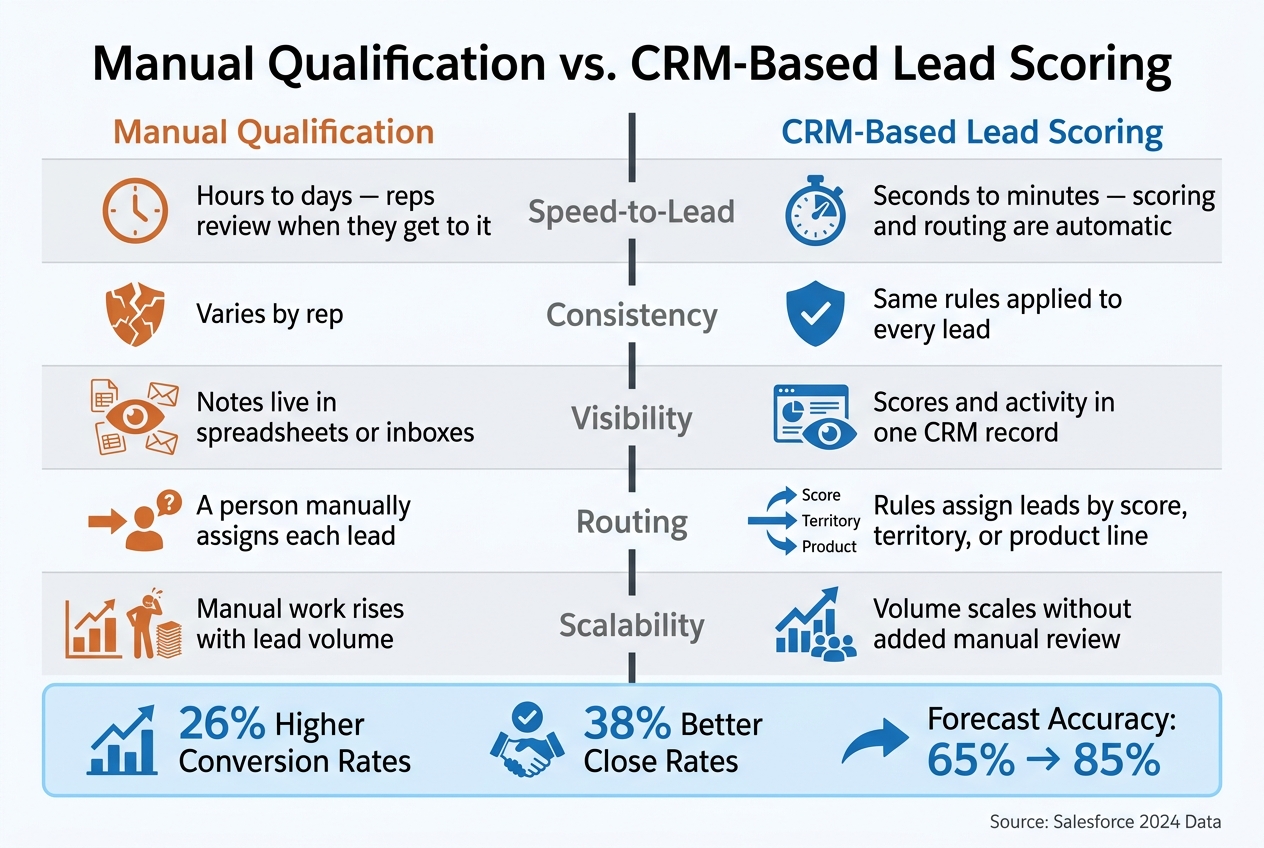
Manual Qualification vs. CRM-Based Lead Scoring: Key Differences
This comparison shows the day-to-day gap behind the five benefits above. Here’s what that looks like in practice:
| Dimension | Manual Qualification | CRM-Based Lead Scoring |
|---|---|---|
| Speed-to-lead | Hours to days; reps review when they get to it | Seconds to minutes; scoring and routing are automatic |
| Consistency | Varies by rep | Same rules for every lead |
| Visibility | Notes often live in spreadsheets or inboxes | Scores and activity live in one record |
| Routing | A person assigns each lead | Rules assign leads by score, territory, or product line |
| Scalability | Manual work rises with volume | Volume scales without more manual review |
Manual review rarely matches a five-minute response window.
You feel that difference fast when lead volume goes up. A process that seems fine with a small flow of leads can start to drag once more names hit the pipeline. Using lead magnet ideas to grow your list is effective, but only if you can manage the influx. What used to take a few checks in a spreadsheet or inbox turns into a bottleneck, and that slows follow-up right when speed matters most.
Conclusion
The manual-versus-CRM comparison makes the payoff pretty clear: integration cuts delays and guesswork and helps teams act faster. CRM and lead scoring turn prospect data into a plain, usable action list, so teams spend less time deciding who matters and more time going after qualified opportunities.
A connected CRM shows which leads to call first, which campaigns bring in sales-ready prospects, and which deals should move to the front of the line. That gives leadership a pipeline view they can trust. Salesforce’s 2024 statistics indicate that lead scoring reduces time spent on low-value prospects by about 27% and improves qualification accuracy by up to 79%.
If you want those gains, start with three basics: capture, score, and route. Map lead capture into the CRM, define the sales-ready threshold, and automate routing. Then track time-to-first-touch, conversion by score band, and forecast accuracy over 30, 60, and 90 days. This work starts at the top of the funnel, where gated content feeds better scoring data. Subpage.co can support this workflow by turning gated whitepapers, checklists, and business case templates into scoring inputs from the start.
When sales, marketing, and operations agree on qualification rules, the CRM becomes a system for predictable growth, not just a database.
FAQs
How do I choose the right lead score thresholds?
Set clear, data-backed thresholds for when a prospect moves from contact to lead, Marketing Qualified Lead, or Sales Qualified Lead. The goal is simple: sales should know who’s ready for outreach, and marketing should know who still needs more warming up.
Give more points to high-intent actions, like demo requests, booking a call, or visiting the pricing page more than once. On the flip side, subtract points for inactivity or signs that interest is fading. That way, your scoring model reflects what people do, not just who they are on paper.
Then map those scores to fixed stage ranges. For example:
- 0–30: Put the prospect into an educational nurture sequence
- 31–80: Treat them as a Marketing Qualified Lead
- 81+: Send them to sales for direct outreach
This kind of setup keeps handoffs clean and cuts down on guesswork.
What CRM data should be used in lead scoring?
Use CRM data that reflects behavioral, firmographic, and intent signals.
- Behavioral: website visits, content downloads, email interactions, product usage frequency
- Firmographic: job title, company size, industry
- Intent: demo requests, pricing page views, specific tool interactions
This helps keep lead scoring accurate and useful.
How long does it take to see results from CRM lead scoring?
Lead generation campaigns can bring in new leads within days or weeks. Lead scoring works on a different timeline. It tends to pay off over time as more data comes in and patterns start to show. Since it relies on behavior tracking, it usually moves more slowly than lead capture.
Review your scoring workflows and CRM integration every 30 to 90 days to keep your data clean and useful. If you use Subpage to connect lead magnets to your CRM, engagement data can flow in real time.
Related Blog Posts
