

5 Benefits of Real-Time Feedback for Lead Qualification

I’d start with one rule: get each lead’s needs, fit, and timing into your CRM before sales follows up. For example, a confirmed budget should help guide the next action – not sit in an unread form response.
After you create effective lead magnets to capture interest, Real-time feedback helps teams:
- Qualify leads faster with answers already in the CRM.
- Improve contact and conversion chances with timely, relevant outreach.
- Score leads more accurately by judging fit separately from engagement.
- Align marketing and sales on which leads qualify and why.
- Route and nurture leads based on their needs, timing, and consent.
My advice: test one lead from submission through follow-up, then track both qualification and sales results. <u>More qualified leads don’t always mean more revenue.</u>
How Real-Time Lead Qualification Feedback Works
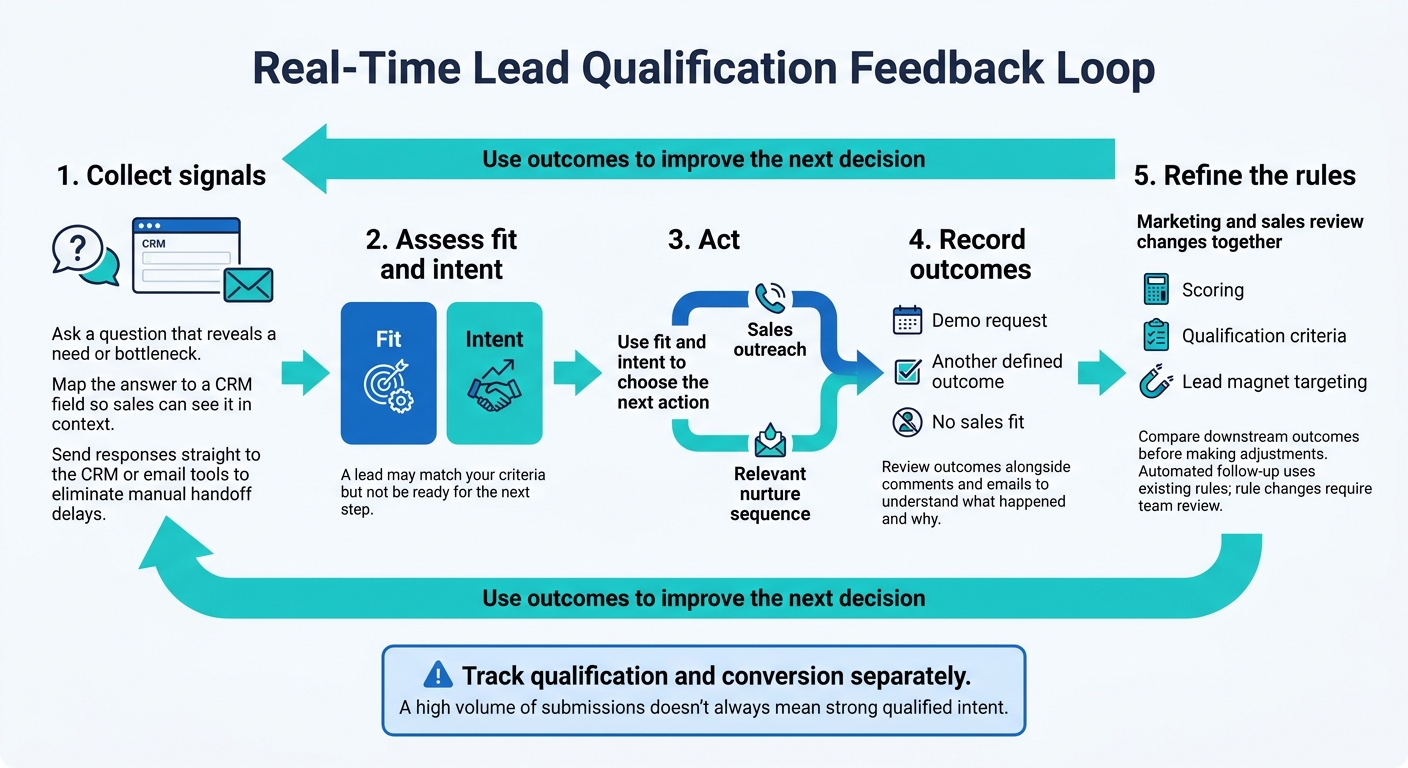
How Real-Time Lead Qualification Feedback Works
The loop has five stages: collect signals, assess fit and intent, act, record outcomes, and refine the rules. Start with a question that reveals a need or bottleneck. Then map the answer to a CRM field so sales can see fit and intent in context. This keeps qualification fast and consistent.
Assess fit and intent separately. A lead may match your criteria but not be ready for the next step. Use those signals to trigger sales outreach or a relevant nurture sequence. Real-time integrations send responses straight to your CRM or email tools, eliminating manual handoff delays.
Fast outreach is only part of the process. Record what happens next, whether that’s a demo request, another defined outcome, or no sales fit. Review those outcomes alongside comments and emails to understand what happened and why – and whether your current rules work.
Automated follow-up follows existing rules. Marketing and sales should review changes to scoring, qualification criteria, or interactive vs PDF lead magnet targeting, comparing downstream outcomes before making adjustments. A high volume of submissions doesn’t always mean strong qualified intent.
Track qualification and conversion separately so rule changes reflect downstream results, not form fills alone.
sbb-itb-b3a7196
1. Faster Lead Qualification Decisions
Give sales enough context to qualify a lead right away. Real-time feedback helps turn each signal into a qualification decision. Company size points to account fit. A stated use case, deadline, or technical question helps sales decide whether to assign an owner, send a sales-ready alert, or request a review.
The sooner a signal reaches the CRM, the sooner sales can act. Use signals that match your qualification criteria, rather than applying the same cutoffs to every lead.
| Signal | Qualification decision | Next action |
|---|---|---|
| Form response: 500+ employees | Enterprise fit | Route to Senior Account Executive |
| CRM status changes to “Re-engaged” | Recycled intent | Add to a “Fast-Track” nurture sequence |
| Chat asks about a custom API integration | High technical intent | Route to a Solutions Engineer for technical review |
| Content activity: viewed 90% of a pricing block | High intent | Trigger a sales-ready alert in CRM |
| Sales note: “Budget confirmed for Q4” | High urgency | Schedule a discovery call |
Automation handles the first pass; people handle edge cases. Bring in a person when context could change the decision, such as a technical question that needs specialist review.
Track the time between submission and CRM entry. Fix sync frequency and field mappings to reduce delays.
2. Better Chances of Contact and Conversion
Real-time qualification helps reps respond before a lead’s interest fades. That improves the odds of a conversation, but it doesn’t guarantee a sale. Speed matters most when the first reply addresses the lead’s stated need.
Make that first touch count by using what the lead already shared. Record their main pain point in a CRM field the rep can see. Reps can then personalize outreach without repeating intake questions.
Measure first-response time, contact rate, response rate, and downstream conversion separately. Also track actions after form submission that suggest interest:
A demo click or reply.
Use these metrics to distinguish fast contact from actual conversion.
3. More Accurate Lead Scoring
Once those signals reach the CRM, score fit and behavior separately – not engagement alone. Keep fit attributes separate from signals such as downloads and repeat visits. Strong engagement shouldn’t outweigh a clear fit mismatch.
Use standard CRM tags – good fit, wrong fit, duplicate, unqualified, and not ready yet – and map them to outcome fields so you can review scoring decisions.
Update records promptly and review scoring rules on a set schedule. When sales learns something new, update the lead’s fit or timing status in the CRM right away. Compare scores against opportunity outcomes, rejection reasons, and feedback from emails and comments to spot scoring drift or missing information.
Sometimes a missed message or handoff gap explains the outcome – not the score. Look for repeated patterns before changing scoring rules, rather than reacting to a single win or rejection.
4. Shared Marketing and Sales Qualification Criteria
Once lead scoring is in place, marketing and sales need to agree on what “qualified” means. SDR and AE feedback helps explain why a lead qualified or stalled, keeping MQL, SQL, and disqualification criteria aligned.
Define what marketing must establish before passing an MQL to sales, what sales must confirm before accepting an SQL, and which reasons warrant disqualification. Record each handoff decision in shared CRM fields so both teams can see it.
Test those rules against campaign-level results. Review feedback across campaigns, keywords, content, and audiences to find patterns in lead quality.
For example, a keyword or offer may drive lots of traffic but consistently attract leads that are not decision-makers.
Use those patterns to refine targeting and qualification criteria.
Assign ownership before changing the rules. SDRs and AEs should record feedback, marketing operations should review recurring patterns, and marketing and sales leaders should jointly approve changes to qualification criteria.
5. More Efficient Lead Routing and Nurturing
Once you know fit and intent, use real-time feedback to send each lead to the right queue. Prioritize high-fit or high-intent leads, and include their answers in the routed record.
Timing matters, too. Send good-fit leads with longer timelines into nurture, and record timing and consent limits to keep follow-up relevant.
Pause nurture for delayed leads. Remove invalid contacts from active workflows when feedback shows they aren’t a fit.
Subpage.co can collect gated-content leads and pass them to your CRM or email tool, where routing and nurture rules run.
Before launch, test one lead to confirm field mapping, record creation, and tags. During the first week, check for delays or failed transfers.
Measure Lead Qualification and Conversion Results
Once routing and nurture rules run, check whether real-time feedback improves results further down the funnel. Set shared qualification criteria and measurement windows before comparing groups.
| Metric | Population or denominator | Outcome event | Measurement window | Responsible team |
|---|---|---|---|---|
| Qualified-lead rate | Total lead submissions | Meets agreed MQL/scoring criteria | 24–72 hours | Marketing / Ops |
| Response time | New lead submissions | First personalized follow-up | Under 5 minutes | Sales / SDRs |
| Meeting rate | Qualified leads | Discovery meeting booked/held | 7–14 days | Sales Development |
| Opportunity-creation rate | Meetings held | Opportunity created in CRM | 30 days | Sales / AEs |
| Closed-won conversion rate | Opportunities created | Deal marked closed-won | Full sales cycle | Sales management |
Keep the comparison consistent: match baseline and real-time groups by source, audience, cycle length, and cohort age.
| Comparison factor | Baseline and real-time groups should match on |
|---|---|
| Source | Same source; separate paid, organic, and event leads |
| Audience | Similar company sizes and decision-making roles |
| Cycle length | Separate short- and long-cycle segments |
| Cohort age | Equal follow-up time; a full sales cycle for closed-won results |
Qualification gains alone don’t tell the whole story. Review rep notes and lead comments to understand where – and why – leads drop off.
High qualification rates can still mask weak revenue. Check opportunity creation, closed-won conversion, and revenue before labeling the change an improvement.
Conclusion: Use Feedback to Improve Lead Qualification
Real-time feedback does more than save time. It keeps qualification rules current – when teams collect leads quickly, sync them instantly, and make someone responsible for reviewing them.
Assign an owner to each field and follow-up rule. Map intent and consent fields in the CRM, have sales review them before outreach, and have marketing track follow-up signals. Keep nurture tied to each lead’s needs, timing, and consent.
Use qualification outcomes to improve the next decision. Feed sales results back into scoring, routing, nurture rules, and follow-up content so the same mismatches don’t keep cycling through the funnel.
FAQs
Which lead signals should I collect first?
Start with your main goal – a demo request or a sales-ready lead – and work backward. Map out four to six key steps, including form starts and submissions.
Ask for name and email first to keep the process simple. Then use progressive profiling to collect company size, industry, and goals over time. Guide sales follow-up by prioritizing behavioral and firmographic signals that match your ideal customer profile.
How should I handle conflicting lead signals?
Marketing and sales should use one shared lead scoring model and threshold, based on fit, behavior, and recency. When signals conflict, let the score – not individual actions – guide the next step. Route leads and change stages only when scores cross agreed ranges.
Follow the same CRM follow-up workflow so everyone sees the same status at the same time. This cuts guesswork and keeps handoffs clear.
How can I tell if real-time feedback increases revenue?
Track lead capture conversion rates in near real time. Then check your CRM to see whether those leads become marketing-qualified leads (MQLs), sales-qualified leads (SQLs), opportunities, and paying customers.
Build a dashboard that pairs conversion and submission rates with CRM status. Lead volume isn’t revenue. Track lead-to-sales conversion and revenue forecasts by lead score range to spot revenue risks early and verify that changes are producing better results.
Related Blog Posts
