

Checklist for Using QR Codes in Lead Generation
Most QR lead-gen problems happen before launch. If I want to improve lead generation from QR codes, I need to check four things first: the destination, the code, the mobile page, and the tracking.
Here’s the short version:
- Pick one clear destination tied to one action, like a form, booking page, or gated lead magnets.
- Use dynamic QR codes when I need post-launch edits, scan data, or UTM-based source tracking.
- Keep the code easy to scan with high contrast, enough white space, and a size that fits the viewing distance.
- Make the mobile page fast – the article points to under 3 seconds on mobile data.
- Keep forms short since each extra field can cut completion rates.
- Tag every code so I can trace leads by placement, offer, and campaign.
- Test the full path on iPhone, Android, older phones, Wi-Fi, and cellular before anything goes live.
A few details matter more than most teams think. The article notes button targets of at least 44 px, body text of 16 px or more, and a code size of about 1/10 of the scan distance. It also warns against weak CTA text like “Scan here” and against printing codes without checking glare, curved surfaces, and final print size.
If I had to sum it up in one line: a QR code only works when the offer, page, form, and attribution all match.
The rest of the article walks through that pre-launch check, step by step.
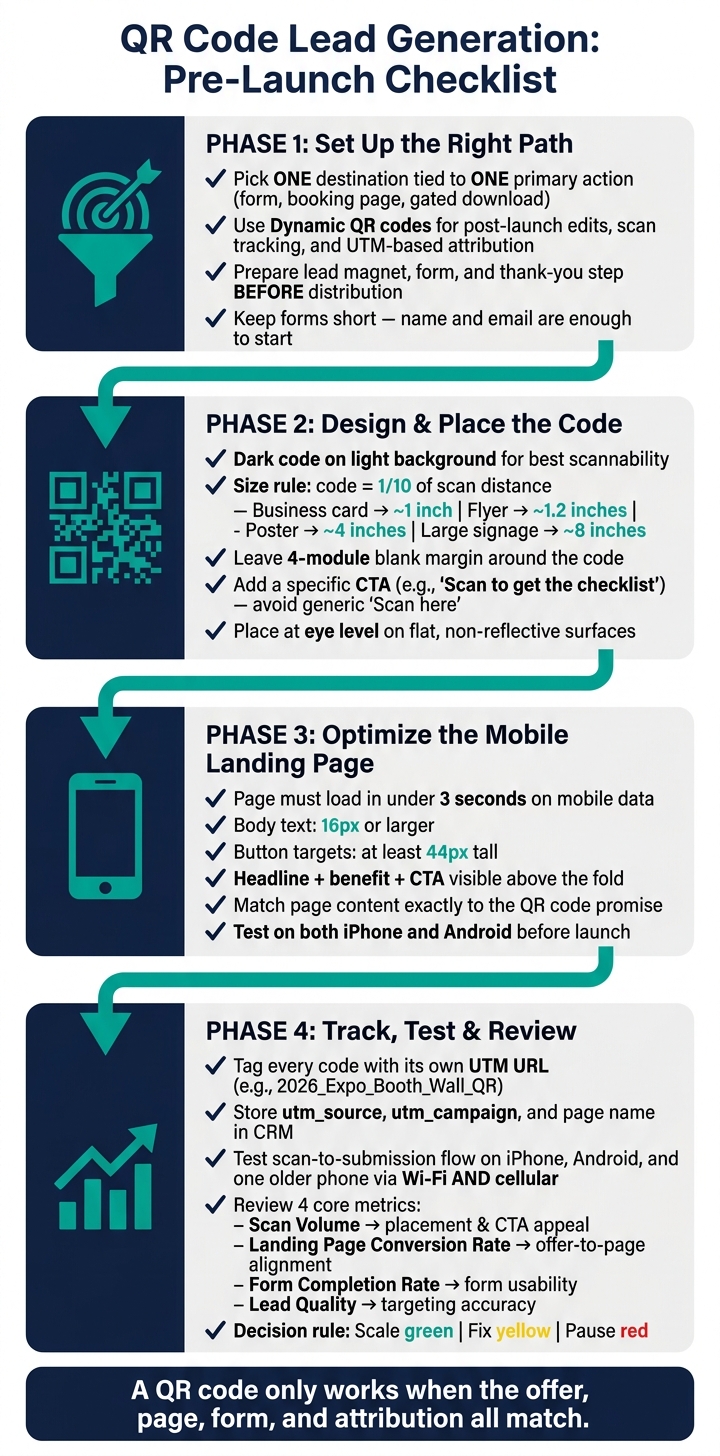
QR Code Lead Generation: Pre-Launch Checklist
How to Use QR Codes to Generate & Track Leads In Your Business | QR Code Marketing Strategies
sbb-itb-b3a7196
1. Set Up the Right QR Code and Lead Capture Path
Before you print anything, lock down the path from scan to submission.
Choose a Destination That Matches the Lead Goal
Pick one destination that fits your lead goal and supports one primary action.
| Destination Type | Best For | Primary Action |
|---|---|---|
| Dedicated landing page | Brief education, one CTA | Download, demo request |
| Short lead form | Events, physical locations, quick interactions | Email capture |
| Gated checklist or whitepaper | High-intent prospects trading contact info for value | Form submission |
| Booking page | B2B, professional services, demo scheduling | Schedule a call |
| Digital contact card | Networking, business cards | Save contact info |
Keep the path simple. If the page asks people to do three things at once, most of them will do none of them. Remove competing CTAs and hide global navigation so the next step is obvious the second the page loads.
With the destination set, the next thing to check is the QR code itself. Can you update it later? Can you track what happens after it goes live?
Use a Dynamic QR Code When Tracking Matters After Launch
Static QR codes lock in one URL. Dynamic QR codes let you change the destination and track scans after printing.
That matters more than it sounds. Dynamic codes send scans through a redirect you control, which means you can swap offers and track scans without reprinting. That’s a big deal for event handouts, direct mail, product packaging, and posters and billboards, where printed pieces can stay out in the world for weeks or months.
They also let you add UTM parameters by placement. So if the same offer appears on a booth sign, a postcard, and a store display, you can see which one is driving leads.
Next up: choose from several lead magnet ideas and ensure the form is ready before anyone scans.
Get the Lead Magnet and Form Ready Before Distribution
Once a QR code is printed or published, the destination is live right away. So before any code goes out, confirm three things:
- The lead magnet is fully accessible
- The form asks only for the fields you need
- The thank-you step is in place
If you use Subpage.co, use it to create the gated page, form, analytics, and integrations in one place.
Keep the form short. On mobile, every extra field chips away at completion. In most cases, name and email are enough to get started. Add one qualifying question only if it changes how you follow up.
Once the destination is ready, check that the code is readable and easy to scan.
2. Check QR Code Design and Placement
Once the destination is ready, make sure the QR code itself is easy to scan and worth scanning.
Keep the Code Clear, High-Contrast, and Large Enough
Scannability comes before branding. The safest setup is still a dark code on a light background. That tends to work better across different lighting conditions. Light-on-dark styles may look slick, but they can fail more often, especially outdoors or in dim event spaces.
Size matters too. A simple rule of thumb: the code should be about one-tenth of the scanning distance. Here’s what that looks like in practice:
| Placement | Recommended Minimum Size | Typical Scan Distance |
|---|---|---|
| Business card or small insert | ~1 inch (2.5 cm) | Hand-held, close up |
| Flyer or brochure | ~1.2 inches (3 cm) | Arm’s length |
| Poster or trade show banner | ~4 inches (10 cm) | 3–4 feet away |
| Large signage or storefront window | ~8 inches (20 cm) or larger | Several feet away |
Leave a four-module blank margin around the code. Don’t let text, borders, or other graphics creep into that space. If you add a logo, keep it centered, small, and away from the corner squares. Before you print anything at scale, test the final size on multiple phones.
Add a Short Call to Action Next to the Code
If people can scan the code but don’t know why they should, you’ll lose them.
Use a short CTA that spells out the benefit. For example, Scan to get the checklist or Scan to download an interactive lead magnet. Keep it short – ideally under 60 characters – and make sure the landing page delivers exactly what the CTA promises.
Generic text like "Scan here" doesn’t say much. It hides the offer and can hurt conversions.
Place the Code Where Scanning Is Easy and Relevant
A good QR code in the wrong spot still won’t do much. Put it where people already stop and have a moment to act. Event booths can drive demo requests. Product packaging can lead people to post-purchase education or content downloads. Receipts and point-of-sale displays can help capture in-store leads.
Some placement mistakes show up again and again. The code may be too high or too low. It may sit on a reflective or curved surface. It may be crowded by other design elements or shoved into a corner where nobody notices it.
Keep it at eye level, unobstructed, and easy to reach with a phone. The less effort it takes to scan, the better.
3. Check the Mobile Landing Experience
A scan only works if the mobile page can turn that visit into action fast.
Make the Page Fast and Built for Mobile
After the scan, the landing page has only a few seconds to hold the lead. Aim for under 3 seconds on mobile data. Put the headline, the main benefit, and the CTA at the top so people see them right away. Keep body text at 16px or larger, make buttons at least 44px tall, and test the page on both an iPhone and an Android phone before launch.
Once the page loads fast, the offer needs to line up with the code.
Match the Page to the Promise Next to the QR Code
Mirror the QR offer in the headline, visuals, and tone.
If the code promises a discount, demo, guide, or signup, the page should show that same promise right away. No detours. No mixed signals. The person who scanned should feel like they landed in the right place within a second or two.
Keep the Form Short and the Next Step Clear
Once the message lines up, cut form friction. Ask only for the fields you need right now, and save extra questions for later. Then make the next step plain so users know exactly what happens after they submit.
4. Track, Test, and Review Results Before Scaling
Once the page works well on mobile, check attribution and test the full path before launch.
Tag Every QR Code for Attribution
Give each QR code its own UTM-tagged URL. That way, you can trace every lead back to a specific code, placement, and offer. Use the same naming pattern across placements so your data stays clean.
In your QR tool, label each code clearly. For example: 2026_Expo_Booth_Wall_QR. Then make sure your CRM stores utm_source, utm_campaign, and the page name when someone submits the form. This makes comparing placements in analytics much easier.
If you use Subpage, attach a separate UTM-tagged URL to each gated page and pass the source data into your CRM.
Once tracking is in place, test the full scan-to-submission path on actual devices.
Test the Full Scan-to-Submission Flow
Scan every code on iPhone, Android, and one older mid-range phone using both Wi-Fi and cellular.
Each QR code should open the right landing page or lead magnet. No 404s. No broken redirects. No offer mismatches. Fill out the form on each device and check that the thank-you screen appears, the CRM source fields populate, and the analytics events fire as expected. Also test printed codes on the final surface to catch issues with glare, curvature, and scan distance.
After the flow checks out, use live data to decide if it’s time to scale.
Review the Core Metrics and Final Checklist
Use the thresholds below to decide whether to scale, fix, or pause.
| Metric | Meaning | Where to Find It | What a Weak Result Means |
|---|---|---|---|
| Scan Volume | Placement visibility and CTA appeal | QR platform analytics / UTM source data | Poor placement, low contrast, or a weak CTA |
| Landing Page Conversion Rate | Offer-to-page alignment | Google Analytics / landing page tool | Mismatch between promise and content, or a slow load |
| Form Completion Rate | Form usability and perceived value | CRM / form analytics | Too many fields or a poor mobile layout |
| Lead Quality | Targeting accuracy and offer relevance | CRM / sales feedback | The wrong audience or offer is attracting unqualified leads |
Scale green, fix yellow, pause red.
FAQs
When should I use a dynamic QR code?
Use a dynamic QR code when you want to change the destination URL or swap out your lead magnet without reprinting or replacing the code that’s already out there.
Here’s why that matters: a dynamic QR code points to a redirect link, not the final URL itself. That makes it handy for testing landing pages, rotating offers, and keeping printed or published materials working even if your URL changes later.
Subpage lets you manage gated content pages and tracking in one place, which makes the whole setup a lot easier to handle.
How do I know if my QR code is too small?
If a mobile device can’t scan your QR code from a normal distance, it’s probably too small.
Print the code and test it on your own smartphone under the same lighting and from the same distance your users will deal with. If your phone struggles to detect or decode it, the code is likely too small or doesn’t have enough contrast.
What should I track from scan to lead?
Track three things from scan to lead:
- Registration rate from form interactions
- Post-gate engagement like bounce rate, time on page, and scroll depth
- Lead quality against your Ideal Customer Profile, including job title and company size
If it fits your setup, Subpage.co can help track visitor behavior and sync qualified leads to your CRM.
Related Blog Posts
