

Email Segmentation Best Practices for Beginners

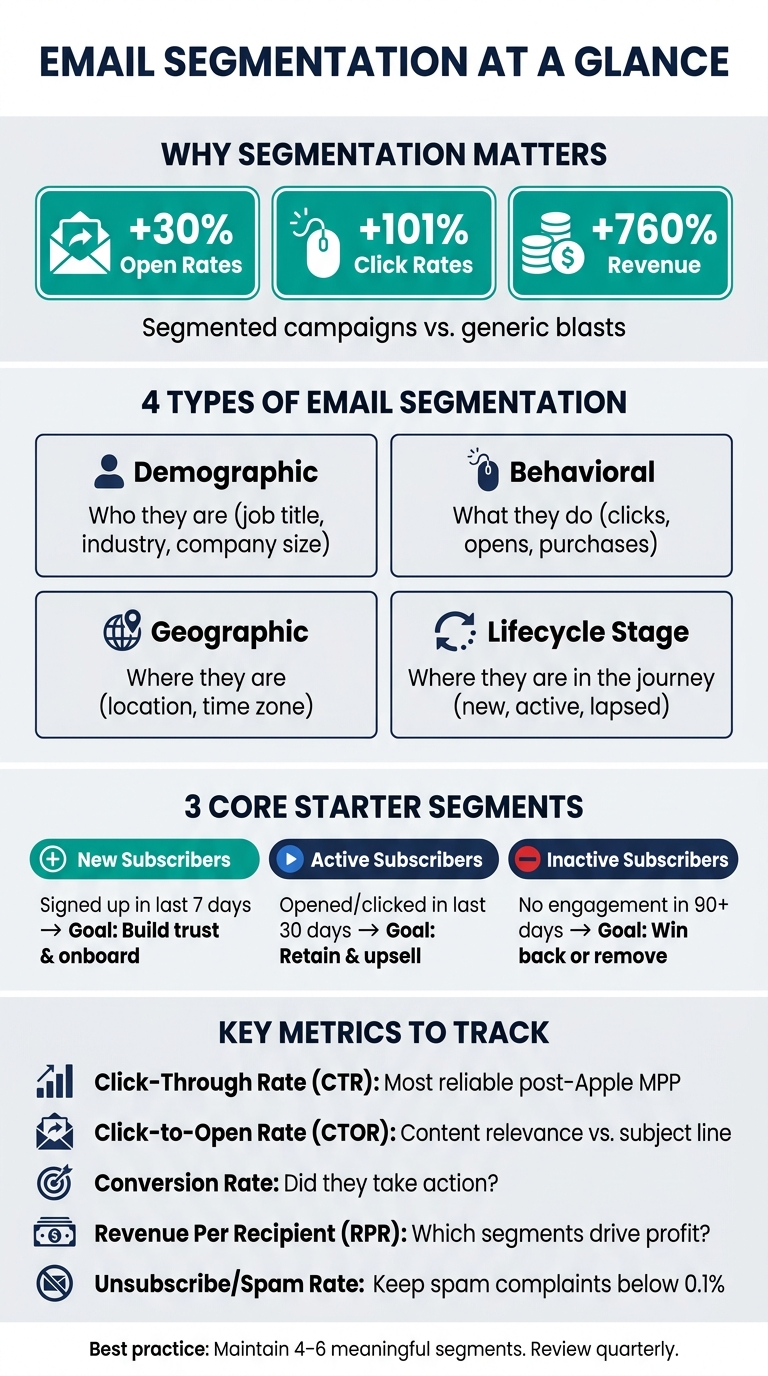
Email segmentation ensures your subscribers get emails that match their interests. Instead of sending the same email to everyone, you divide your list into groups based on factors like behavior, location, or how they signed up. Why does this matter? Segmented campaigns can boost open rates by 30%, clicks by 101%, and revenue by up to 760%. Plus, relevant emails reduce unsubscribes and keep your messages out of spam folders.
Here’s how to make segmentation work for you:
- Start simple: Focus on 3 core segments – new, active, and inactive subscribers.
- Use data wisely: Collect basics like email, name, location, and signup source.
- Leverage behavior: Track clicks, purchases, and engagement to refine your groups.
- Automate tagging: Tools like Subpage.co can tag subscribers based on lead magnets or signup forms.
The goal? Send the right message to the right person at the right time. Even small steps, like targeting by lifecycle stage or engagement level, can significantly improve your email performance.
Email Segmentation: Core Segments, Metrics & Best Practices
Email Segmentation Best Practices
Core Concepts of Email Segmentation
Before diving into splitting your email list, it’s important to understand how segmentation works and the kind of data that makes it all possible.
Types of Email Segmentation
There are four main types of email segmentation you should know about.
- Demographic segmentation groups people by who they are – for example, their job title, company size, or industry.
- Behavioral segmentation focuses on what they do – such as which emails they open, which links they click, or whether they’ve made a purchase.
- Geographic segmentation organizes your list by location or time zone, which helps you time your emails more effectively.
- Lifecycle stage segmentation sorts subscribers based on their relationship with you – whether they’re new leads, active customers, or people who haven’t engaged in a while.
"Subscribers are different. And they want different things from you… Based on what they’ve done – and not done – and who they are, we can send them targeted, more tailored emails instead of lumpy generic blast emails." – Joanna Wiebe, Copyhackers
You don’t need to tackle all four types at once. Starting with lifecycle stage or behavioral data alone can already make a noticeable impact. Once you’ve decided on a segmentation type, the next step is identifying the key data points that will bring those segments to life.
Key Data Points to Collect for Segmentation
To make segmentation work, you’ll need data that clearly differentiates your subscribers. The good news? You don’t need a ton of information to get started. Here are five essential data points for beginners:
- Email address
- First name
- Location (often captured automatically via IP)
- Signup source (e.g., which lead magnet or page they came from)
- Preferences (a simple question like, "What’s your biggest challenge?" can reveal a lot)
Keep in mind that quality matters more than quantity when it comes to data. Invalid or outdated email addresses can harm your deliverability before you even hit send. Running your list through a validation tool can help safeguard your sender reputation. And don’t overwhelm subscribers by asking for too much information upfront – start with the basics, then use your welcome sequence to gradually collect more details through progressive profiling (a step-by-step approach to data collection).
Using Lead Magnets to Build Segments
Lead magnets are a great way to automatically tag subscribers and simplify segmentation from the very beginning. They work because they capture revealed preference – the subscriber’s choice of lead magnet gives you insight into their interests.
"How someone joined your list tells you what they care about. Someone who downloaded your ‘Beginner’s Guide to Meal Prep’ is in a completely different headspace than someone who signed up through your ‘Advanced Keto Recipes’ lead magnet." – Oxify App
Here’s how different types of lead magnets can translate into actionable segments:
| Lead Magnet Type | Data Point Collected | Resulting Segment |
|---|---|---|
| Buying Guide | Product Interest | High-Intent Prospects |
| Discount Popup | Price Sensitivity | Coupon-Driven Buyers |
| Webinar Registration | Topic Interest | Content-Specific Leads |
| Quiz/Survey | Personal Preferences | Persona-Based Segments |
| Gated Case Study | Industry/Role | B2B Firmographic Segments |
The trick is to automatically tag subscribers during signup based on the form or page they used. This eliminates manual sorting and ensures segmentation happens instantly. Tools like Subpage.co make this process simple by offering features like gated content pages, checklists, and whitepapers, along with built-in lead collection tools and integrations to route subscribers into the right segments right from the start.
Best Practices for Email Segmentation
Start with a Few Core Segments
When you’re just getting started, keep it simple. Focus on creating a few foundational segments that will deliver quality results without overwhelming your workflow.
A good starting point? Use these three categories:
- New subscribers: Those who signed up within the last 7 days.
- Active subscribers: Those who opened or clicked an email in the last 30 days.
- Inactive subscribers: Those who haven’t engaged in 90+ days.
These segments provide a solid structure for targeted messaging. By focusing on these groups, you can leverage the data collected at signup while keeping your strategy manageable. Once you’re comfortable, you can add more layers of complexity.
"Segmentation isn’t a nice-to-have. It’s the difference between a 12% open rate and a 40% open rate." – Alex Berman
Use Behavioral and Lifecycle Data
After setting up your core segments, refine them with behavioral and lifecycle data. Behavioral signals – like clicks, purchases, or site visits – are some of the most reliable indicators of what someone wants next.
"Past actions predict future actions more accurately than demographics." – BounceCheck Team
Lifecycle data complements behavior by focusing on where a customer is in their journey with your brand. For instance, a first-time buyer needs introductory content, while a repeat customer might respond better to loyalty rewards or premium offers. Tailoring your messages to align with the customer’s stage avoids two major pitfalls: overloading new subscribers with aggressive sales pitches and missing opportunities to deepen relationships with loyal customers.
Here’s a quick breakdown of how lifecycle segmentation can guide your messaging:
| Lifecycle Segment | Messaging Focus | Goal |
|---|---|---|
| New Subscribers | Introduce your brand and its value | Build trust and onboard |
| Active Customers | Highlight rewards and new offerings | Retain and upsell |
| Lapsed Customers | Offer reactivation deals or request feedback | Win back engagement |
For example, Huda Beauty revamped its email strategy in 2025 by limiting regular emails to subscribers who had engaged within the last 120 days. Full-list emails were reserved for major annual sales. This shift led to double the year-over-year growth in attributed revenue, thanks to improved deliverability and more relevant targeting.
Keep Your Segments Manageable
It’s tempting to create a segment for every possible scenario, but more isn’t always better. Over-segmentation can dilute your data and make analysis unnecessarily complicated.
A good rule of thumb: Stick to 4–6 core segments. As Alex Berman wisely notes, "If a segment doesn’t change what you say or how you say it, it doesn’t need to exist". Before adding a new segment, ask yourself if it will genuinely influence your messaging.
Whenever possible, rely on dynamic segments that automatically update based on subscriber behavior. Static lists become outdated fast, and research shows that 56% of people will unsubscribe if the content feels irrelevant.
Next, we’ll dive into practical strategies for taking these principles to the next level.
sbb-itb-b3a7196
Practical Segmentation Strategies
Segment by Engagement Level
A straightforward way to begin segmentation is by grouping subscribers based on their recent activity. Try the 30/90 rule: send full-on promotions to those who interacted within the last 30 days, softer educational emails to those active in the past 31–90 days, and a win-back campaign for anyone idle for over 90 days. This layered strategy helps you tailor your messaging while keeping your list organized.
| Engagement Tier | Activity Window | Recommended Strategy |
|---|---|---|
| Engaged | 0–30 days | Share product launches, promotions, and time-sensitive offers |
| Neutral | 31–90 days | Provide educational content, social proof, and re-engagement nudges |
| Dormant | 90+ days | Send win-back incentives; remove if no response after 120 days |
Apple’s Mail Privacy Protection (MPP) complicates open-rate tracking, impacting over 50% of email opens. Instead, rely on link clicks, replies, or website activity to measure engagement accurately.
Segment by Lead Magnet or Signup Source
Another effective method is segmenting based on how subscribers joined your list. Their signup source often reveals their interests. For instance, someone who signed up via a beginner’s checklist download will likely have different needs than someone who browsed your pricing page. By tagging subscribers at signup, you can send them a welcome sequence that aligns with their initial interest.
"Segmentation is choosing which room to walk into. Personalization is what you say once you’re inside that room." – Oxify App
Tools like Subpage.co make this process seamless by linking gated content to its corresponding signup form. This ensures every new subscriber is automatically tagged with their source, allowing for precise targeting without manual effort.
Segment by Location or Time Zone
Timing is everything in email marketing. As Alex Berman explains, "An email landing at 11 PM local time is basically invisible. Segment by region and schedule accordingly." Most email platforms have time zone scheduling features – use them to send emails around 8–10 AM local time, when subscribers are most likely to engage.
Location data also prevents irrelevant messaging. For example, promoting winter gear to Phoenix residents in October misses the mark. If you operate a physical store or host local events, zip code–based segmentation ensures you invite only nearby subscribers, keeping your campaigns relevant. For accuracy, prioritize location data collected during signup over IP-based tracking.
These practical segmentation strategies lay the groundwork for better targeting and improved email performance as you refine your approach in future campaigns.
Measuring and Improving Segmentation Performance
Once you’ve implemented segmentation strategies, it’s essential to track specific metrics to ensure your efforts are working and to identify areas for improvement.
Metrics to Track for Each Segment
Measuring the performance of your segments is critical for fine-tuning your approach. Relying on open rates alone isn’t enough anymore – thanks to Apple’s Mail Privacy Protection (MPP), open rate data can be inflated by 40%–60%. This makes other metrics much more reliable for gauging engagement.
Here are the key metrics to focus on:
- Click-Through Rate (CTR): This measures how many recipients clicked on a link in your email. Post-MPP, CTR is a more dependable indicator of engagement.
- Click-to-Open Rate (CTOR): CTOR shows the percentage of clicks compared to opens, helping you evaluate whether the content delivered on the promise of the subject line.
- Conversion Rate: Tracks how many recipients completed a specific action, like making a purchase or downloading a resource. This metric highlights how well a segment is performing.
- Revenue Per Recipient (RPR): RPR identifies which segments are contributing the most to your bottom line by showing the revenue generated per subscriber.
- Unsubscribe and Spam Complaint Rates: A rise in these rates for a specific segment often indicates a mismatch between your content and audience. Bulk senders need to keep spam complaint rates below 0.3%, with 0.1% being the recommended threshold.
| Metric | What It Measures | Why It Matters |
|---|---|---|
| Click-Through Rate (CTR) | Recipients who clicked a link | A more reliable engagement metric post-MPP |
| CTOR | Clicks divided by opens | Evaluates content relevance to the subject line |
| Conversion Rate | Recipients who completed a goal | Shows true effectiveness of a segment |
| Revenue Per Recipient (RPR) | Revenue generated per subscriber | Highlights the most profitable segments |
| Unsubscribe/Spam Rate | Opt-outs or spam complaints | Indicates content-audience mismatch |
How to Refine Segments Over Time
Segments aren’t static – they evolve as subscriber behavior changes. For instance, someone who downloaded a beginner’s guide months ago might now prefer advanced content or may no longer be interested. To keep segments relevant, conduct quarterly audits. Ask yourself: are these segments still behaving as expected? If not, it’s time to adjust your criteria.
A/B testing is another valuable tool for refining segments. Test one variable at a time – such as a subject line, call-to-action (CTA), or offer – to see what resonates most with a particular audience. Testing within a specific segment provides clearer insights into what works.
"The real job is to build segments that let you beat your own control group because the message is more relevant, the timing is tighter, and the offer matches what that subscriber actually cares about." – Filip Konecny
Another strategy to consider is adaptive frequency. This involves emailing your most engaged subscribers more frequently while reducing the frequency for those showing less interest. Not only does this help reduce unsubscribes, but it also protects your sender reputation. A good rule of thumb is to target 70% of your campaigns toward your most engaged segments.
Comparing Segment Performance with Tables
To identify trends and opportunities, compare segment metrics side by side on a quarterly basis. This allows you to spot differences in performance – like one segment converting better than another – which could point to messaging issues rather than traffic problems.
A simple table tracking metrics like CTR, CTOR, conversion rate, and unsubscribe rate can highlight both high-performing segments (indicating effective strategies) and underperforming ones (which may need reworking).
"If a segment doesn’t change what you say or how you say it, it doesn’t need to exist." – Alex Berman, Founder
Conclusion
Email segmentation boils down to a simple formula: deliver the right message to the right person at the right time. By focusing on behavioral data – like email clicks, page visits, and purchase history – you can gain a much clearer picture of what your subscribers are actually interested in, compared to relying on demographic details alone. Combine this with lifecycle strategies, and you’ll see segmented campaigns consistently outperform generic ones, leading to better click rates and higher revenue.
To keep your segments useful and up-to-date, schedule regular reviews – quarterly is a good rule of thumb. Stick to 2–6 meaningful segments; if a segment doesn’t influence the content or timing of your emails, it’s probably unnecessary.
Getting started with segmentation early is key. Tools like Subpage.co make it easy for beginners to create lead magnets – such as checklists, whitepapers, and gated guides – that capture interest signals during signup. By connecting Subpage to your email platform via Zapier, you can tag new subscribers based on their source and start segmenting from day one.
"The goal is relevance at scale. You’re not writing a custom email for every subscriber – you’re writing different versions for meaningfully different groups." – Alex Berman
Begin with a few segments, rely on real data, review your strategy regularly, and use automation tools to streamline the process. This straightforward approach, driven by timely and relevant data, lays the foundation for effective email segmentation across your campaigns.
FAQs
What’s the easiest way to choose my first segments?
Start with a narrow focus by targeting high-priority groups that match your business objectives, such as boosting revenue or improving customer retention. Avoid spreading yourself too thin by creating multiple overlapping audiences. Instead, concentrate on 1–2 focused segments using the data you already possess – like purchase history, user engagement, or sign-up sources. Platforms like Subpage.co can assist in organizing this data and crafting segments that align with your goals.
Which engagement signals should I use if open rates are unreliable?
Since Apple Mail Privacy Protection affects the accuracy of open rates, it’s smarter to shift your attention to more dependable metrics. These include link clicks, visits to key pages on your website (like the pricing page), content downloads, product usage patterns, and email replies.
You can also rely on time-based signals to refine your audience segmentation. Look at factors like recent activity, purchase history, or event-driven triggers – such as cart abandonment – to create meaningful and effective audience groups without depending on open rates.
How do I auto-tag subscribers from lead magnets in Subpage.co?
Subpage.co doesn’t come with a built-in tagging system for subscribers. However, you can still automate lead tagging by using tools like Zapier or webhooks. These integrations allow you to connect your lead magnet to your email marketing platform or CRM.
Here’s how it works: once you’ve set up the integration, configure your email provider to automatically tag new subscribers based on the specific lead magnet they interacted with. This keeps your segmentation streamlined and ensures your audience is organized without manual effort.
Related Blog Posts
