

How Trigger-Based Automation Boosts Lead Generation

Trigger-based automation can bring in more leads and better leads by sending follow-up based on what people do, not when your calendar says to send it. In the article, I show that triggered emails get 70.5% higher open rates and 152% higher click-through rates than batch emails, and that behavior-based emails can drive 200%–400% more email revenue when timing and message match the action.
Here’s the short version:
- I focus on triggers that map to clear intent: content-led lead magnets, form submissions, pricing or demo page views, trial activity, lead score thresholds, and inactivity
- I explain how to build workflows with clear entry, suppression, and exit rules
- I cover timing that fits the action, like 15–60 minutes for abandoned forms and 1–3 hours for repeat pricing-page visits
- I show what to measure: open rate, CTR, unsubscribes, sequence completion, MQLs, SQLs, pipeline, deal size, and sales cycle length
- I point out that each trigger should be measured on its own, not mixed into one email average
- I also show how Subpage.co can act as the lead source for gated assets and send new leads into email tools, CRMs, or webhooks right away
What this comes down to is simple: trigger, route, respond, measure. If I base follow-up on intent signals instead of fixed send dates, I can move leads faster, cut wasted sends, and give sales a better shot at talking to people at the right time.
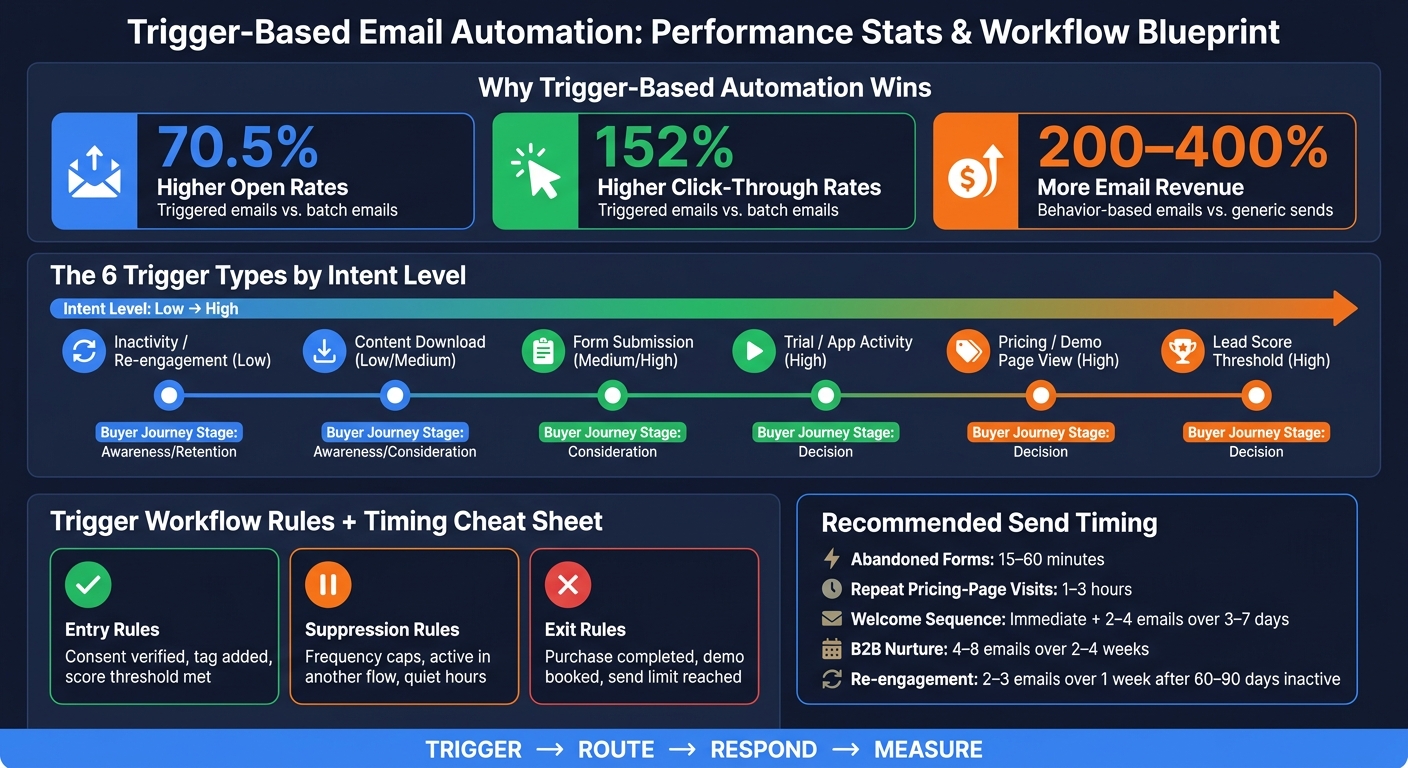
Trigger-Based vs. Batch Emails: Key Performance Stats & Workflow Rules
Multiple Trigger Automation: Sending Emails For a Variety of Events
sbb-itb-b3a7196
The Trigger Types That Produce the Best Lead Generation Results
Choose triggers based on intent: capture, qualify, convert, or re-engage.
This list starts with low-friction capture triggers, then moves toward higher-intent conversion and reactivation triggers.
| Trigger Type | Intent Level | Buyer Journey Stage | Primary Lead-Gen Goal |
|---|---|---|---|
| Content Download | Low/Medium | Top (Awareness) | Capture initial contact info |
| Form Submission | Medium/High | Any | Data enrichment |
| Pricing / Demo Page View | High | Decision | Sales conversion |
| Trial / App Activity | High | Consideration / Retention | User activation |
| Lead Score Threshold | High | Decision | Sales-qualified lead handoff |
| Inactivity / Re-engagement | Low | Retention | Reactivation |
Content Download and Form Submission Triggers
Start with triggers that turn anonymous visitors into known leads.
Content downloads are one of the simplest ways to do that. When someone swaps their contact details for a whitepaper, checklist, or business case, you get a clear trigger event. You also learn what they care about, which makes later follow-up much easier.
Form submissions matter just as much when you want to enrich a lead record before sending that person into nurture or sales. More data means better routing and better timing.
Subpage.co cuts down a lot of the friction here. You can build content-focused lead magnets like whitepapers, checklists, and business cases in a Notion-like editor without technical skills. Then you can connect those form submissions to your email platform or CRM and kick off a nurture workflow automatically.
High-Intent Behavior Triggers: Pricing, Demo, and Trial Activity
Once a lead is known, behavior signals help you qualify intent.
Pricing-page visits, demo requests, and trial activity often point to buying intent. Say a lead visits your pricing page three times in one week. That can trigger a reassurance campaign with customer cases.
Trial and app activity triggers work in much the same way. They let you guide people toward activation with follow-up that lands at the right moment, instead of sending the same generic message to everyone at once.
Lead Score and Re-Engagement Triggers
After qualification, use scoring and inactivity rules to route or revive leads.
Lead scoring takes a bunch of smaller actions and rolls them into one number your team can act on. If a prospect’s engagement score passes a set threshold, that can trigger a high-touch marketing action or an internal alert for sales so the team can follow up fast. Lead scoring usually needs CRM logic, so it tends to take more setup than a simple URL-based rule.
Re-engagement triggers sit on the other end of the range. If a lead hasn’t opened an email in 30 days, a time-based trigger can send a short sequence built around high-value content. Just be careful with frequency. The risk of over-contact is high in these campaigns.
How to Build Trigger Workflows That Convert Without Annoying Leads
Map the Lead Journey and Choose High-Value Events
Once you know which triggers matter, build the workflow around the small set of events that actually push leads closer to a sale.
Start by mapping the lead journey: capture, welcome, education, engagement, conversion, and re-engagement.
Then narrow your focus to 3–5 high-intent events that tie straight to pipeline movement. Pick events that change the next message or routing, like demo requests or repeated pricing-page visits. If a trigger doesn’t change the content or timing of the next step, it’s probably not worth building.
It also helps to rank triggers by lifecycle stage. In many cases, the new-lead welcome sequence is the best place to begin. That window closes fast, and automated welcome emails generate nearly 70% higher open rates than standard batch sends.
Those events should shape the workflow rules from the start: who gets in, who gets held back, and when the sequence stops.
Set Entry, Suppression, and Exit Rules
Every workflow needs three rule types to keep things clean and avoid over-messaging.
| Rule Type | Purpose | Examples |
|---|---|---|
| Entry | Qualifies who enters the sequence | Consent verified, specific tag added, lead score threshold met |
| Suppression | Prevents too many messages | Frequency caps, active in another flow, quiet hours |
| Exit | Stops the sequence once the goal is met | Purchase completed, demo booked, hit the send limit |
Without these rules, automation can get messy fast. A lead might get pulled into the wrong sequence, receive too many emails, or stay in a flow long after the goal has been met.
Match Timing, Cadence, and Copy to the Trigger
Once the rules are in place, adjust the speed and rhythm of the workflow to match the trigger.
Timing should reflect intent. Send high-friction recovery emails, like abandoned lead forms, within 15–60 minutes. For high-intent research behavior, such as repeated pricing-page visits, a 1–3 hour delay often works better. The reason is simple: send fast, because response rates drop after the first hour.
Cadence should match the workflow type:
- Welcome sequences can start right away and continue with 2–4 more emails over the next 3–7 days.
- For complex B2B leads, a nurture sequence may run 4–8 emails across 2–4 weeks.
- Re-engagement workflows are usually tighter, with 2–3 emails over 1 week after 60–90 days of inactivity.
Copy is where a lot of trigger workflows go off track. The message should name or clearly reflect the action that started it, then line up with the lead’s likely intent. A repeat pricing-page visitor may need more detail, reassurance, or proof. A browse-abandonment email, on the other hand, should lean on comparison details or social proof.
How to Measure Whether Trigger-Based Automation Is Generating More Leads
The KPIs That Matter Most
Once your workflow rules are live, the next step is simple: measure each trigger on its own.
That part matters more than it sounds. If you judge triggered workflows by blended email averages, you blur the picture. A strong pricing-page sequence can get buried next to a weak newsletter flow. To see whether a trigger is driving qualified leads, track it separately.
It helps to look at performance in two layers.
Engagement KPIs show whether people are interacting with the workflow:
- Open rate
- Click-through rate (CTR)
- Unsubscribe rate
- Sequence completion rate
Outcome KPIs show whether that engagement turns into pipeline and revenue:
- MQL/SQL volume
- Pipeline contribution
- Average deal size
- Sales cycle length
Velocity matters too. A workflow that pushes leads through the funnel faster can be worth more than one that only adds more names to the top of the list.
As Mike Pastore, Head of Content & Media at MarTech, puts it:
"Marketing teams… are able to track not only the number of leads at different stages, but the velocity at which the leads move along the journey."
That’s a big deal. More leads sounds good on paper. But if another trigger gets people to MQL or SQL faster, that’s often the better bet.
Compare Triggered Campaigns Against Generic Campaigns
Next, compare triggered workflows against your normal campaigns.
Use your standard email baseline to measure lift in opens, clicks, and lead quality. For example, run a triggered nurture campaign against a generic promotional email. Or compare a pricing-page trigger sequence with an untargeted send. That side-by-side view makes the gap easier to spot.
This kind of workflow-level view also helps you find weak paths fast. A re-engagement trigger might look fine inside a blended report, even if it’s driving more unsubscribes than reactivations. Pull it out on its own, and the problem jumps off the page.
Use Analytics to Refine Trigger Logic Over Time
Once workflows are up and running, review three things on a set schedule: trigger volume, drop-off points, and conversion by trigger source.
Those signals tell you:
- How many leads enter each sequence
- Where people stop engaging
- Which entry events bring in leads that keep moving forward
For gated lead magnets, source-level analytics can show which assets bring in the strongest leads. If your current assets aren’t performing, consider testing new lead magnet ideas to drive more signups. For interactive lead magnets vs PDF lead magnets built in Subpage.co, source-level analytics show which lead magnets generate the best leads.
| Trigger Type | Core Metrics | Intent Signals | Common Failure Signs | Optimization Focus |
|---|---|---|---|---|
| Email-Based (Welcome, Newsletter) | Open rate, CTR, Unsubscribe rate | Early-stage engagement, Resource downloads | High unsubscribe rate, Low sequence completion | Subject line A/B testing, Value-driven copy |
| Behavioral (Cart, Pricing Page, Demo) | Conversion rate, Revenue per email, AOV | Add to cart, Pricing page visits, Trial starts | High cart abandonment, Low demo show-up | Timing/cadence, Incentive/discount offers |
| Score-Based (MQL/SQL Handoff) | MQL/SQL volume, Pipeline contribution, Sales velocity | Crossing point thresholds, High-intent content downloads | Sales rejection of leads, Stalled opportunities | Lead scoring weights, Qualification criteria |
Also track exit rules. If people convert and still keep getting the same messages, trust can drop fast.
Using Subpage.co as a Trigger Source for Lead Capture
Build Gated Lead Magnets Without Design or Development Work
Once you know which actions should kick off follow-up, the next step is simple: capture the lead fast.
Subpage.co gives teams a quick way to create and publish gated whitepapers, checklists, business cases, and other gated content pages with a simple editor. You don’t need design help. You don’t need dev time either. When someone unlocks a gated asset, Subpage sends a New Lead trigger that can start nurture, scoring, or sales routing.
Collect Lead Data Through Forms, Pop-Ups, Top Bars, and Widgets
That trigger gets a lot more useful when each submission comes with enough detail to qualify the lead.
Subpage collects lead data through embedded forms, pop-ups, top bars, and widgets. Each submission creates a timestamped event tied to the asset where the person converted. It also includes email, location, and browser and device data. That gives your team more to work with than a name in a spreadsheet.
You can use that data to:
- Route leads to the right team
- Localize follow-up
- Split nurture paths by topic
You can also add qualifying questions to tag leads and tailor follow-up based on what they need.
Send Lead and Performance Data Into the Rest of Your Stack
After that, the trigger needs to flow into the tools your team already uses.
Subpage can send new leads in real time through Zapier, Make, Activepieces, or webhooks. The New Lead trigger fires as soon as the form is submitted, so welcome emails or CRM entries can go out right away. Subpage also supports CSV export and built-in analytics, which helps you review lead quality and see how each asset is performing.
Conclusion: A Simple Formula for Better Automated Lead Generation
Trigger-based automation works best when the whole system is connected: trigger, route, respond, measure. Start with high-intent signals. Then set clear entry and exit rules so leads don’t get pulled into more than one workflow or stay in a sequence after they convert. And when you check performance, look at each workflow on its own instead of leaning on blended averages.
The next step is simple: focus on the signals that point to buying intent. Triggered emails beat routine newsletter emails with a 70.5% higher open rate and a 152% higher click-through rate. On top of that, behavioral triggers can increase email revenue by 200–400% when the message matches what the lead actually did.
Over time, results depend on clean data flow from capture to CRM to analytics. Use holdout groups to measure true lift. Audit your workflows every 30–90 days. And keep your eye on lead quality, not just volume. That’s how trigger-based automation turns behavior into more qualified leads.
FAQs
What makes a good trigger?
A good trigger sends the right message to the right person at the moment it matters most.
That means it should come from a clear user action or a meaningful system event, not some random schedule.
For example, a trigger might fire when someone:
- Downloads a resource
- Abandons a cart
- Visits a pricing page
Why does that matter? Because the message feels more relevant, more timely, and more helpful.
How many trigger workflows should I start with?
Start with one trigger workflow tied to a clear goal, like a welcome sequence for new signups. Set the entry and exit conditions first so the setup stays simple and easier to control.
Once you’ve measured performance and know it’s working, add more workflows little by little. You might spot 8 to 12 trigger points right away, and that’s fine. Still, build, test, and refine one flow at a time.
How do I know if a trigger is improving lead quality?
Track whether the behavior-triggered flow leads to higher-intent actions, not just opens. Look at delivery, link click-through rate, conversions, and revenue or the lead action connected to each trigger.
Then compare results by trigger type. At the same time, keep an eye on unsubscribe and spam complaint rates.
If conversions are weak or start slipping into negative territory, pause that trigger. Then adjust the timing or tighten the audience fit before turning it back on.
Related Blog Posts
